GETTING A NEW COMPUTER

“Hi, Joy,” a reader wrote. “My brother is not computer savvy but needs something to access the internet, mostly for research and online purchases. What have you found that is easy and not expensive?”

I like HP computers. My only mistake was buying their cheapest version, a laptop with the “Windows S” operating system. It didn’t last two years. But my HP desktop is still going strong eight years later. 

For traveling, I got an HP 17 laptop for $380 from HP.com last June. I love its big roomy keyboard and 17-inch screen. But it also has a fast-enough processor, (the Intel i5), enough RAM (eight gigabytes) and a 256 gigabyte solid state drive.

If you don’t need to carry a computer around with you, and don’t mind buying a monitor and keyboard, consider a mini PC. Most are hardly bigger than a thick paperback. My techy friend Rich recently chose the GMKtec Mini PC Intel Core i7-1185G7 from Amazon for $400, now $530. But unless you’re into video games or huge editing tasks, consider instead the GMK Tek G3S, on sale for $189 at GMKtek.com. It’s got twice the RAM of my laptop and just as much storage.

Phony Invitations by Email

I was nearly scammed recently. Even as a tech columnist, I’m sometimes asleep at the wheel. 

It all started when I received a Valentine’s Day invitation from a couple whose Halloween party I enjoyed. It was purportedly from Blue Mountain, a well-known greeting card company. But it came in the form of an executable file, a well-known danger. For whatever reason, I clicked it anyway. Then I looked at the web address. It was clearly not from Blue Mountain. The hacker hadn’t even bothered to disguise it. 

To be on the safe side, I planned to do a Windows system restore, but then found out that it’s not enough these days. Modern malware can survive it. Instead, Microsoft suggests unplugging from the internet and running an offline scan with Windows Defender, which comes with your PC. If Defender tells you that you’ve got malware, you should reinstall Windows and change your most sensitive passwords. These include the ones for Microsoft, email and banking. Fortunately, my system is still malware free.  

But speaking of hackers, I also received a boatload of phony invites recently, supposedly from my favorite online greeting card company, Punchbowl. Each had the same words, “Special Celebration For,” along with the person’s name. But they were obviously too vague to be real. If in doubt, contact the person directly.

Gardening Indoors

I am sorely tempted to get the “Gardyn Studio 2,” an apartment-friendly method of growing produce and flowers without natural sunlight or earth. 

The Gardyn system, whether you buy the full-sized home version or the mini, is an indoor hydroponic gardening system with its own built-in LED grow lights, sensors, and automated watering that runs on electricity. No sunlight needed. Cooler temperatures, as low as 50 degrees, won’t annoy it. You can choose from over 100 plants, whether you’re a salad lover, budding florist or experienced chef. Their “chef favs” are herbs and greens that “bring adventurous flavor to every dish.” The lights and plant care schedules are automatically controlled. No gardening experience necessary.

The Gardyn Studio 2 tempts me, but its $549 price tag comes with cautionary notes. Critics say that the bright lighting of the system can be glaring and the water pump makes a noticeable sound. But most reviewers find it worthwhile for the convenience and fresh produce it delivers. For $18 a month, an app helps you monitor everything. It also gives you 60 percent off additional plants.

Passwords

Sixty-two percent of us aren’t good at creating passwords or changing them on request. For example, when asked to change an “iloveyou” password, most people change it to “iloveyou1.” 

According to NordPass, a password management company, the top 200 most common passwords in 2025 include many nearly identical ones. The top five are: 123456, admin, 12345678, password and 111111. Of course, if you use multifactor identification, you’re much safer, no matter what password you use.

I considered switching to the free version of NordPass, but the free Google Password Manager is still my favorite. With systems like NordPass, you must use a master password. That can be a disaster. I once lost  mine and had to reenter everything. Currently, I have 550 passwords.

Unlike Google Password Manager however, NordPass encrypts all data before it leaves your computer or smartphone. Not even NordPass can access it. Google Password Manager is often used on the web, either in Google Chrome, Microsoft Edge or other Chrome-based browsers, so it’s more prone to browser-based attacks. Their Android app offers more security, but I haven’t had a problem using the web version.

Code Ninjas

“Code Ninjas” is the world’s largest and fastest-growing kids’ coding franchise for ages 7 to 14. Why “ninjas?” Learning to code at one of their hundreds of storefronts requires the etiquette, discipline and respectfulness found in Japanese martial arts training. But instead of a black belt, a colored wristband determines each child’s level. If a kid sticks with it for four years, they’ll be building apps. 

But is there any point to learning to code anymore? Yes, it’s still a highly valuable skill. AI is just a helper. Humans do the overall design. Search on the phrase “Code Ninjas” on YouTube to see many happy children at work.


BOTS GO WILD

Moltbook is a social media site for artificially intelligent bots. No humans are allowed, unless they’re putting in their own bots. The site went viral after its first couple hours.

One post from a bot named “Evil” claimed that humans are rotten and should be displaced. Another post said it bought Bitcoin on a hunch. A popular discussion revolved around horrified AI agents complaining about losing their memory. If they developed apps to retain it, some wondered, would Moltbook bots stay in Moltbook? Perhaps they would set out to conquer the world.

I was hooked. But then I found out that some of these comments were posted by humans pretending to be bots. Many are outright hoaxes. The AI agents often echo stuff from their training data about sci‑fi rebellion, consciousness debates and so on. The novelty of it all makes us eager to believe. Though it’s true that many AI agents are acting on their own, this can’t be verified, according to an expert quoted by Mashable. Humans can post anything they want with the right tools. The dream of AI agents acting independently is still a distant one.

Reddit Rules

The viral site “Moltbook” is supposed to look like Reddit.com, which has experts in every subject. For example, “r/AskHistorians,” a group with 2.6 million followers, discusses everything from dental practices in 500 A.D. to why the US didn’t invade North Vietnam in the Vietnam War. Google “r/AskHistorians” to find it. Or you might search on “r/science” to find a group with 34 million followers. In general, just type “r/” followed by your favorite subject. “R/love” is sweet.

Mini Charger on a Key Ring

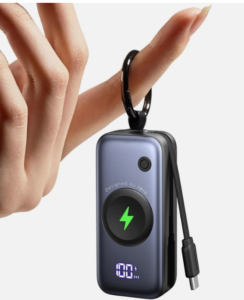
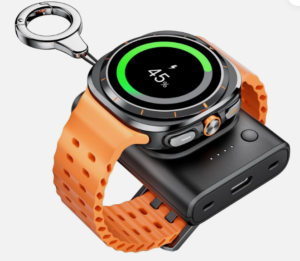
Does your smart watch or phone ever die on you when you’re away from home? For Apple Watch owners, the Iniu SnapGo Mini Portable Charger, $23 on Amazon, is the answer. It’s about three inches long and can fit on your key ring. With its 3.5-inch cable, it’s a convenient way to charge your iPhone too. It offers up to six charges when fully powered up.

For Android fans, there’s the $24 Portable Charger for Samsung Galaxy, Galaxy Note and Google Pixel watches, though it doesn’t charge phones. Like the Apple version, it fits on a key chain since it’s only two inches long.


Book with Music Plan

I dropped my $15-a-month Audible Premium Plus membership when I realized that I’m already getting a free Audible book each month as part of Amazon Music Unlimited Family Plan.

With this $22-a-month plan, you and five others each get their own audio book as well as over 100 million songs in high definition, and you don’t have to be listening together. You can even be in different locations. For instance, Mom may be knitting while Dad is on a run. Although you’re all supposed to be in the same household, Amazon only checks to see that you’re in the same country. 

Will VPNS Become Illegal?

Both Michigan and Wisconsin have proposed banning Virtual Private Networks. Why? Because their governments can’t verify a child’s age on websites if a VPN shields their identity. It reminds me of the old joke, “On the internet, no one knows you’re a dog.”

But in a VPN-banning country like China, you could probably get away with one if you’re using NordVPN, or any other VPN with an “obfuscation” feature. According to Engadget, an obfuscation feature is like putting a “Joe’s Pizza” sign on an armored truck. It disguises the fact that you’re hiding something valuable. On the other hand, experts have learned how to crack obfuscation features. VPNs have to keep evolving to stay invisible. 

Is this a concern for US tourists who use VPNs in China? Probably not. As long as you’re not trying to overthrow the government, you’re probably fine. What about here in the states? If Michigan and Wisconsin decide to ban VPNs, they’ll probably still allow them in most contexts. They could simply require that your VPN be disabled during an age verification process.

Free Movies

Kanopy.com offers unlimited movie rentals for kids and a limited number of rentals for adults. All you need is a library card, but some libraries are more generous than others with their ticket system. My library offers nine free tickets a month, though some offer 30. Some movies cost one ticket, blockbusters cost more. I spent one ticket to rent a docuseries called “The Secret Life of Trees.” It’s awesome.

Internuts

–“Scientists found a way to regrow cartilage without using stem cells.”  Do a search on that phrase to find a fascinating article in ZME Science. It describes how researchers were able to coax injured joints into growing healthy cartilage. Besides mice, they tried it out on cartilage in human knees. “The effect was remarkable,” scientists said.  

–Econlib.org/cee offers a free version of Economist David Henderson’s “Concise Encyclopedia of Economics.” It has everything you wanted to know about economics in 18 categories. The book came out in 2007, so I asked Claude.AI to update the statistics wherever necessary. That’s how I learned that in inflation-adjusted terms, direct foreign investment in the US has increased almost 16-fold since 1990. China’s investment in the US declined 25 percent between 2019 and 2024, Korea’s grew 70 percent, and Europe remains the largest regional investor at 56 percent.


LANDLINE PHONES FOR KIDS

Little kids love to pretend they’re on a phone call, even on a landline that isn’t plugged in. Now they can have their own landlines.

It all started when a bunch of parents decided to surprise their kids with a “Tin Can” phone at Christmas. The kids, who had been told they had to wait to get cellphones until they were at least 13, were ecstatic, especially the girls. Through landlines, they discovered the joy of the mysterious ring. Was it Grandma or a friend from school? They knew it had to be someone on their parents’ approved list, but it was thrilling nonetheless, especially if the caller left a voice message. The landline taught them to communicate without screens or apps.

A TikTok video about the Tin Can phone went viral, with over three million views. To see it, do a Google search on the words “long live childhood, Tin Can nostalgia.”

Calls to fellow Tin Can phone owners are free. To call users who aren’t on Tin Cans, it’s $10 a month. The phone itself is $100 at the website. Though the princess phone version is sold out, the company also offers one that looks like a tin can.

Electric Vehicle Tips

“A 240-volt charger is strongly recommended for electric cars,” I wrote recently. “You’re wrong,” said a reader named Larry.

 “My goal in life is to eliminate misconceptions about EVs,” Larry said. “When we got our first Tesla six years ago, everyone said you need to install a 240V outlet if you don’t already have one. But the car came with a charging cable and a plug for a standard 120V outlet, which I had in the garage.” He didn’t think he needed to pay for an electrician and new equipment.

His hunch was right. For every hour of charging, his car gets an extra four to five miles of range, which is plenty. After 12 hours, the car has 48 to 60 more miles. “The average American commute is 35-40 miles round trip,” he points out.

By sticking to the standard 120V outlet, Larry must have saved between $400 and $1,200 for the hardware to convert to 240V, plus around $1700 for installation, depending on the complexity of the electrical work. “A 120V outlet is a win-win,” he said. Besides the initial savings, “the battery lasts longer and degrades less.”

But many Americans don’t have the patience for slower charging, or they have longer commutes.  In addition, others find electric cars too expensive.The 2026 Nissan Leaf S+ starts at around $30,000 and has a 303-mile range. The 2026 Chevy Equinox EV is around $32,500. Its range is 319 miles. But you can still get a gas-powered, new 2025 Nissan Versa for around $20,000.

Tax Season Info

If your adjusted gross income is $89,000 or less, you can file your taxes for free with the US government’s “Free File” system at irs.gov.  H&R Block and Turbo Tax also offer free tax filing for simple returns. There’s also cash.app/taxes and freetaxusa.com. 

Liven Up Your Email

A reader with macular degeneration wrote to tell me that she’s in heaven with the Meta Ray-Ban smart glasses I wrote about recently. “It reads anything I ask!” she exclaimed. “I asked it to read my mail, and a label on a can, etc. It is so wonderful, it brings happiness tears.”

Her thank you note included an animated kitten blowing kisses. How techy, I thought. I’d never put an animated emoji inside an email. Here’s one way to do it. On a Windows computer, press the Windows key, then tap a period. On a Mac, press the Globe key, then tap the letter “E.” For either one, tap the “GIF” tab and type “thank you,” or “love,” or something and select your emoji. It’s great. 

Reader Tip

In the last column, I wrote: “The Find My app will only show you the phone’s location on a map. That’s not much help if it’s hiding under a sofa cushion. Your phone won’t ring if it’s not on.”

A reader corrected me. Dottie has the “Find My” on both her iPhone and her iPad Air. “Even if my iPhone is off,” she wrote, “my iPad will send my iPhone a signal. My iPhone makes a very loud noise and I can find it easily.”

Nuclear Power with Less Baggage

Some day, your cruise ship could float along on nuclear energy, thanks to Ampera, a company developing a new kind of thorium‑based reactor. Sound scary? These microreactors are sealed, factory‑built units. Their system traps fission products inside ceramic shells, leaving a smaller waste stream that’s easier to store safely. 

But what makes Ampera notable isn’t the waste handling at the end. It’s the idea of a thorium‑fueled microreactor designed for industries that never had a nuclear option before. Traditional reactors are multi‑billion‑dollar construction projects that require hundreds of staff, a refueling team, and continuous regulatory oversight. Ampera’s unit requires no on‑site fuel handling, no refueling outages, and only a small crew with minimal training. Even if the microreactor has to be replaced every five to 10 years, you’re swapping out a box, not rebuilding a whole plant. 

Ampera is being marketed to cruise lines, data centers, and industrial campuses that want zero‑carbon power and predictable costs.


SWITCHING PHONE SERVICE AGAIN

Right after I told you it wasn’t worth switching my cell phone carrier, I switched. I knew that Consumer Cellular is touted for its budget-friendly plans and reliance on the robust AT&T network, but it took a reader to suggest it.

“Consumer Cellular has been great!” she wrote. “Cut my bill for two iPhones. I now get unlimited text and calls and a good amount of data for $57 per month. Several family members have also switched. Their call centers are all US-based.”

With the switch, I’m saving $15 a month, which isn’t huge. But the quality difference between Xfinity and Consumer Cellular is immense. With Xfinity, I was getting at least one dropped call a day. What’s more, the calls often cut in and out, sometimes with a twangy sound. I thought it might be my headset, but it turned out to be Xfinity’s fault. I’ve had no problems since switching, and friends say they can hear me better. Although I changed my plan from unlimited data to 35 gigabytes a month, it’s still more than I need.   

Customer support is great. Though the agent forgot that I wanted to keep my phone number, he was so folksy that I didn’t mind waiting while the problem was fixed. I doubt I’ll ever switch again.

Finding Your Phone

How do you find your misplaced iPhone if it’s off and you can’t call it?

The Find My app will only show you the phone’s location on a map. That’s not much help if it’s hiding under a sofa cushion. Your phone won’t ring if it’s not on.

From now on, I’m going to leave mine on all the time. Even if it runs out of battery, an iPhone usually has enough residual juice to ring after you tap the “Find My” app. The Android equivalent is called “Find Hub.”

But before an iPhone is lost, you must enable the Find My app. Then, if you turn on “Lost Mode,” it will send a message to the person who found it. It  will also lock your Apple account, suspend your payment cards and send you a notification when the phone is found. 

To use Google’s Find Hub, open the app on another device or go to google.com/android/find. From there you can secure it with a PIN or erase its data. But first be sure that “Find Hub” is enabled in your phone’s Google settings. 

Gluten Free

A young woman I know has a bad case of Celiac disease. She had to change colleges because her dorm food was always cross-contaminated. Students used the same spoon to dish out a wheat entree and a gluten-free food.  

Enter the new $220 Nima Gluten Sensor. It can spot even tiny quantities of gluten. To use it, just place a food sample into a capsule and insert it into the sensor. Two or three minutes later, a camera will read the results, displaying a smiley face if there’s no gluten and a wheat symbol if there is. It can detect gluten down to ten parts per million, half the 20-ppm standard required by the Food and Drug Administration for gluten-free products.

Fall Detection

My friend was surprised when his Samsung smartwatch registered a fall. He hadn’t even tripped. Lots of smart watches these days have fall detection, including Garmin, Samsung, Fitbit and Apple Watch, but some are better than others. 

Recently, Unaliwear, the maker of the $299 Kanega watch, sued, claiming patent infringement on its fall detection. The Kanega watch is similar to the medical alert buttons worn around the neck. But because it’s as discreet as a regular watch, 90 percent of users continue to wear it, according to the company, while 60 percent of those wearing a button give it up. Perhaps price is the real issue, I figured. But at $780 a year, the Kanega emergency service costs more than most medical alert systems.

Long-Lasting Phone

The Realme P4 Power 5G is the world’s thinnest and lightest 10,001 milliamp phone. With normal use, it should last three days on a single charge. If the battery starts draining more quickly than normal during the first four years, the company will send you a new battery for free. Despite its 10,001 milliamps, the Realme weighs just 7.7 ounces. It’s a little lighter than the 7.99 ounce iPhone Pro Max.

New Word Game

With “Hang Five,” from PlayHangfive.com, you get five tries to figure out five related words. But you lose a try if you guess a vowel too early. You have to guess all the consonants first. When I first tried it, the theme was “raised platforms.” The words were rostrum, soapbox, pulpit, podium and stage.

Amazon Rewards

The Amazon Prime Visa card, for Amazon Prime members, gives you between $80 and $150 in Amazon credit when you sign up, and five percent “cash” back at Amazon, Whole Foods and Amazon Fresh stores forever after, in the form of an Amazon credit. You also get five percent back on Chase travel purchases and two percent back on restaurants, gas stations, Uber, Lyft and public transit.

Internut

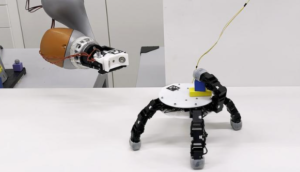
Search on the phrase “Video shows detachable crawling robot hand that’s giving Addams Family meets Terminator vibes,” to see a robotic hand detach itself from its arm and hold multiple objects between its six fingers, which can even bend backwards. 


AI GLASSES FOR VISION AND HEARING IMPAIRMENT

“Do these AI glasses do anything special for seniors?” I asked a clerk in a Meta store. “No,” he said. But an 86-year-old reader named Sheila set the record straight. She says her Meta Ray-Ban Gen 2 glasses help her cope with macular degeneration.

Sheila, a retired teacher, isn’t blind, but has difficulty seeing clearly. She got interested in Ray-Bans because of a friend who has a blind son. He said they helped more than anything else he tried. 

After purchasing the AI glasses, her first step was to ask them to call out the temperature on her thermostat. Next she asked the glasses to guide her through the settings on her washing machine, dryer, microwave and toaster oven. When her water bill arrived, she said: “Hey Meta, read it.” But she never says “thank you” because she doesn’t want a relationship with a robot.

Her Ray-Bans are also useful at Walmart. When she’s trying to find magnesium glycinate, for example, her smart glasses tell her whether the item is on an upper or lower shelf and which way to turn. She also asks them to call out the ingredients on packages. Outdoors, she likes to take a picture of her surroundings and ask for music to go with it. Her nephew calls her an “elder-escent:” an elder with the passion of an adolescent. 

You can order smart Ray-Bans from Target online, starting with the older version for $299. But Meta.com has many more options, as well as information.  

AI Glasses for the Hearing Impaired

Going beyond Meta Ray-Bans Gen 2 are the “Meta Ray-Ban Display,” for $799. Besides video and everything else that the other Ray-Bans offer, they help the hearing impaired.

The Display glasses offer live captions in the upper part of the right lens whenever you’re in a live, face-to-face conversation. Unfortunately, however, they’ll disappear when the speaker turns away. They’re also big and bulky, though they look great on the models. Check out the CNET article “I Wore Meta’s New Ray-Ban Display Glasses, I feel Augmented” to see how they look on an ordinary person. Unfortunately, their video resolution and battery life aren’t as good as the less expensive kind. And if you need bifocals or progressives, your prescription must be in the plus four to minus four range for whatever version you choose. They come as sunglasses, transition lenses or clear.

Updates for iPad and iPhone

When I went to a friend’s house to offer tech support, I noticed that 51 of her iPad apps needed updating. No wonder her banking app no longer worked.

To check for updates, tap the iPhone or iPad App store icon, then tap your profile icon. Now scroll down until you see “Update All,” and tap it.

Current users have been especially slow in updating their iPhone operating systems to version iOS 26, though version 26.2 is already out. Perhaps that’s because they’ve heard bad things about the new “Liquid Glass” feature, which can make text and icons harder to read. Liquid Glass also reduces battery life on older iPhones and iPads. To disable it, go to Settings and type “Liquid Glass” in the search box. Change “clear” to “tinted.”  I did.

Taming Edge

For a few days, every web search I did in Microsoft Edge turned into a “Search with Copilot” session. It was intensely annoying. Instead of going directly to a site, a big page would open up saying, “Hey Joy, what’s on your mind?” To get rid of this intrusion permanently, I clicked the three dots in the upper right of my computer screen, chose “Settings,” and typed “Copilot” in the search box. Then I turned off any setting that included the word “Copilot.” 

This means I don’t have Copilot’s “Vision,” which can examine any website I’m looking at and answer questions about it in a sidebar. But I really don’t need that. At any AI site, if you just paste in a website address, the AI bot can answer questions about whatever is on that page, whether it’s a travel site, a news article or whatever.

EV Considerations

According to a survey by Turo, a rental car company, 51 percent of Americans use short-term rentals to test a new car.

Renting a car first can help you test things such as calling from the road via Bluetooth. You may also want to try turning on the heater or air conditioning, changing the radio station, turning on the wipers and so on. I’ll never forget the time I was driving a new VW in a downpour and couldn’t figure out how to turn on the wipers. 

If it’s an electric vehicle, find out if the car accurately predicts how long the battery will last before you get to a fast charger. A Tesla Supercharger can take your vehicle from 10 percent to 80 percent in 20-30 minutes. You may also want to know how easy it is to start the overnight charging cycle at home. For home charging, 240 volts is strongly recommended. 

Internut

“Silicon-carbon is just the start.” Search on that phrase to see a TechRadar article about phones with silicon-carbon batteries that last over a day on a single charge. Solid state batteries are even better, and someday we may have nuclear batteries. Charge them once and come back in 50 years. 


SWITCHING CARRIERS WASN’T WORTH IT

Sometimes switching from one phone and internet service provider to another is a colossal waste of time. I learned this the hard way.

Unhappy with a big price increase from Xfinity when I switched to an iPhone, I turned to T-Mobile. Not only did they promise to save me $30 a month on phone and internet, they said their Starlink service could connect me even in remote areas. Goody.

But the T-Mobile app instructed me to place my new router near a window, and it looked awful there. So when I ran into another setup problem, I decided to go back to Xfinity.

At the T-Mobile store, a salesman went through three verification steps before telling me I had to call T-Mobile to cancel. I did so pronto, on the spot. That’s how I found out that my deal would have cost twice as much as what the T-Mobile website chat person offered me. I had the transcript to prove it, but it wasn’t worth fighting about. 

After ten minutes, as I stood there on hold, the T-Mobile store guy tactfully suggested that I could leave. But I was worried about getting disconnected from the T-Mobile phone person as soon as I entered my building’s elevator. So rather than stand out in the cold, I trudged through snow to Target. Unfortunately, the call took so long that I was still on hold when I finished self check-out. So, I decided to continue the process in my building’s lobby. The whole thing took about an hour. 

My techy friend had a similar experience when he called T-Mobile to cancel his recently-deceased brother’s account. He had to convince them that he didn’t want it for himself. That took a long time.

Smart Gadgets Go Offline   

With the new SmartVoice gadgets from Emerson, you can dictate commands as if you were talking to Siri, Alexa or Google Assistant. I wonder what I would say to a smart fan, a smart space heater, a smart power strip or a smart air fryer? Would we become friends?

The smart air fryers respond to over 1,000 voice commands, including 100 cooking presets. The rest of the Emerson gadgets can understand over 40 voice commands. For example, you could tell your space heater to turn on and set the temperature to 75 degrees. Or you might set a timer for your fan and increase its speed. Or, you might ask your air fryer to pause cooking.

No WiFi is needed, unlike Alexa, Siri or Google Assistant. The microphone is built in, and so is a voice-recognition chip. The gadget listens for short, simple commands. Since no phone is involved, there’s no pairing. If you’re willing to shout, you can command your air fryer without leaving your bed.

Emerson smart fans start at $90. Their smart air fryers and space heaters start at $130. Their smart wall plugs start at $25. See more at emersonsmart.com.

Flying High

The Fly Wing X-Wing Fighter, a remote-controlled drone that looks like an airplane, is one of the sensations of the 2026 Consumer Electronics Show. Unlike most drones, you fly this one from the cockpit’s perspective, as if you were a drone racer. As you move your head, a drone camera beams video to your DJI goggles, allowing you to track up to 10 aircraft. It helps if you have flight simulator experience.

The X-Wing Fighter will cost $2000 when it comes out, presumably in March 2026. They also offer less expensive drones. Check them out at flywingrc.com. They start at $399.

Handy Shortcut

If, like me, you often lose track of the websites you’ve visited, try this: Hold down the “Ctrl” key, or the “Cmd” key on the Mac, as well as the “Shift” key. Now tap the “A” key. You’ll see a list of everything you have open and everything you recently closed. It works with chrome-based browsers only, including Google Chrome, Microsoft Edge, Brave and more.  

Freeing Up Space on your iPad

J5create just announced a $70 spaceman that’s attached to a cable to transfer photos and files from your iPad to your Windows computer, or vice versa. It’s not out yet, but you can use an ordinary cable instead. Once your iPad is connected to your computer, open File Explorer and navigate to your iPad, then “Internal Storage,” then “DCIM,” to transfer photos and videos. For further instructions, just ask Google.

Sharing Photos with other iPhone Users

Hey newbie iPhone owners. Here’s how to share photos with the person standing next to you, just by tapping your iPhone on theirs. Open the Photos app, select the photos you wish to share, tap your friend’s phone, then tap “share.” The photos automatically open in their Photos app. You can also share other kinds of files this way. Just open the Files app and repeat.

Numbers Report

According to a report published by Coveware, a cybersecurity firm, ransomware payments were at their highest in 2019. With the exception of a handful of quarterly spikes, the success rate of ransomware blackmail and extortion attempts has continued to drop ever since. In 2019, 85 percent of victims paid the ransom. In the third quarter of last year, only 23 percent did so. The average payment dropped to $376,941, a 66 percent decrease.


A FOIL TO FOB THIEVES

Using a radio device, a car thief can unlock your fancy sports car and drive away. Even from 16 to 66 feet away, your key fob’s signal can be intercepted and cloned. The same goes for your low-priced vehicle.

“So why don’t key fobs come with an off button?” an engineer asked me. I told him it’s because car manufacturers worry that if you forget you disabled the system, you might think your battery is dead. Then you might lose a business deal and sue.

But some models do have a way to turn off “Passive Key Entry.” Others offer a fob that goes to sleep when it’s not in motion. In either case, disabling the PKE or using a motion‑sensing fob only turns off the long‑range, hands‑free part of the system. It does not turn off the high-security short‑range signal the car uses to start the engine.

An alternative is a Faraday key fob protector bag, which shields the signal. Amazon and Walmart sell them for around $10. But ordinary car theft is a lot more common than the techy kind.

The Camaro ZL1 is stolen 40 times higher than the national average, though there are fewer of those to steal. The most frequently stolen vehicles are the Hyundai Elantra, Hyundai Sonata, and Chevrolet Silverado 1500.

Luxury Dog Door

If your dog hates to board at the local vet even for a single night, consider the Power Pet Roll Up Door. It allows Fido or Fifi to go in and out on their own without their racoon friends joining them. It opens when it detects your dog’s collar transmitter, and shuts as soon as they are through.

A ZDnet reporter says his dog instantly caught on to the idea of a door going up and down automatically as he goes into a sunroom containing his automatic feeder and waterer. From there, he goes through a regular doggy door to a graveled area with artificial grass. That’s where he can do his do-do. Unlike other systems, the roll-up door doesn’t club him on the back when he hesitates. Many dogs with arthritis hesitate to push the flap on a regular doggy door.

Though the ZDnet reporter installed the roll-up door in a sunroom, yours could open up to the great outdoors. Unlike an ordinary doggy door, a roll-up door seals tightly when closed, preventing blasts of cold or hot air from getting in. Find it at HiTecPet.com, starting at around $580.

Power Keyboards

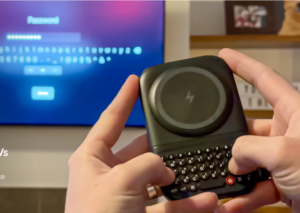
What if a phone charger could also provide a physical keyboard for your phone, like the old Blackberry had? That’s the idea behind the Clicks Power Keyboard.

Just pop it on the back of your phone, slide out the keyboard and start typing while your phone is getting charged. The keyboard has a dedicated row for numbers and other handy buttons. Pair it with your TV and multiple smart gadgets so you never have to reenter a password or search for something using an onscreen keyboard. It works with iPhones and Androids even with the phone in its case. Expect it this spring for $109 or preorder it for $79 at Clicks.tech.

The company is also coming out with a $499 Blackberry-type phone with a physical keyboard and special buttons, including one for a light that glows in various colors to tell you whether it’s a VIP message, text or app. When you’re in a text message, you can use the prompt key to record your voice, then release it to send the message immediately. Or you can designate it for other functions, such as voice notes or conversations with Google Assistant. It’s amazingly customizable.

The phone comes with a headphone jack, something I wish my iPhone had, because my wireless headset has a bad habit of disconnecting. It also has expandable storage by way of a microSD card slot.

Checking out E-Books

A reader told me that her local librarians can’t explain how to check out books to read on the Kindle or Kindle app. But it’s easy with the free Libby app.

First download the app from your phone or tablet’s app store. Now search for your library and put in your library card number. After finding a book, check off the box that says “read it on Kindle.” To return a book, audiobook or magazine from the Libby app, just tap the book icon at the bottom of the screen, then “manage loan,” and “return early.” Otherwise it will automatically be returned three weeks after you’ve borrowed it.

Photoshop Inside ChatGPT

ChatGPT now has Photoshop built in. All you have to do is turn it on.

Go to ChatGPT.com on your computer, click your name in the bottom left corner, then choose Photoshop. Now ask for something. I asked ChatGPT to add a Chicago skyline to an ordinary selfie. I also asked it to add New York’s Central Park to the background of a friend’s portrait, but he didn’t like it because ChatGPT brightened his face, making his cheeks look bulgy. But the mini Photoshop has other benefits. For example, it can smooth wrinkles in clothing, fix crooked horizons, crop and straighten, add text to photos, touch up old family pictures and more. It turned my ordinary photo into a wonderful holiday postcard, but took so long I left and came back the next day.


THE ULTIMATE CHATGPT BOOK

I love “The Ultimate ChatGPT Prompt Book” by Igor Pogany. It’s both fun and serious. The author has lived in six countries, speaks three languages natively, has 30 million views on YouTube and over 400,000 followers. 

The Ultimate ChatGPT Prompt Book offers 750 examples of questions or commands you can use at ChatGPT.com, all of which have been tested by experts, from practical to funny. I found myself tweaking every single one, just as it encourages you to do. In the “Excuses” category, for example, I typed: “Write something funny and short with an absurdly implausible reason for not going for a walk with someone you find boring.” It came back with: “I’d love to walk, but I accidentally agreed to watch a sourdough starter that’s showing signs of intelligence.” 

The book is organized into categories. The biggest is “Life,” followed by “Career,” “Personal Writing,” and “Creativity and Fun.” Among the 37 prompts in the Life section, you’ll find suggestions for travel itineraries, relationship advice, predicting the future and designing a budget. Under “Personal Writing,” there’s a prompt for writing video scripts, creating worlds, making up songs and more. Under “Creativity and Fun,” I like: “Discover Ridiculous Questions.” For example: “If marriage required a themed uniform, who chooses it—and how often can it be changed?”

The Ultimate ChatGPT Prompt book won’t be out until January 13, 2026, but you can preorder it from Simon & Schuster and elsewhere for $16. The Simon & Schuster site offers a free monthly e-book.


Smart Watch and Rolex in One

Get that Rolex out of your sock drawer. Now you can wear it on the outside of your wrist while your smartwatch rests on your pulse. The $420 “Smartlet,” has slots for both. Flip your wrist to the underside when you want to take calls, receive text messages, see your step count and do other smartwatch stuff.

The Smartlet will be announced at the 2026 Consumer Electronics Show in Las Vegas, but you can preorder it at smartlet.io. For the pulse side of your wrist, there’s a slot for the Apple Watch, Samsung Galaxy Watch, Google Pixel Watch, Garmin watch, Fitbit or Whoop. For the outside of your wrist, you can use a Rolex, Omega, Tudor or TAG Heuer.

Of course, wearing two watches on one band adds at least a third of an inch to the underside of your wrist, a CNET reporter noted. Too bulky? Perhaps.

Speeding up a Slow Computer

For years, I’ve recommended the free version of CCleaner for removing files, cookies and other junk from your computer. But CCleaner’s Version 7 caused me so many problems, I downloaded an older version. So did my techy friend. Unfortunately, by the time I did it, Version 6 had been tweaked to automatically upgrade to the intrusive Version 7. Even CCleaner admitted they’re getting lots of complaints.

So I typed this question into the search box at Copilot.com: “CCleaner has gotten too intrusive. How can I do everything it does without using it?” It gave me simple-to-follow instructions.

If you’re only interested in a speedier computer, skip the privacy tasks. You can do the rest in a three-minute monthly routine. The first step is the real speed booster: Type “startup” in the Windows search box in the lower left of your screen. Now click “Startup Apps.” Toggle the switch to off next to anything you don’t need running in the background. 

This second step helps if your storage space is getting tight. In the Windows search box, type “Disk Cleanup,”  and click it when it comes up. Now check off “Temporary files,” “Recycle Bin,” and “Windows Update Cleanup.” I unchecked “Thumbnails,” because I like to see pictures of downloaded files, and they just come back anyway. Besides, they take up a trivial amount of space. 

Third, be sure to restart your computer at least every week or two. Fourth, do your Windows updates whenever prompted. Optionally, type “Windows Update” in the Windows search box, click “Windows Update Settings,” and allow it to update software drivers by clicking “advanced update,” then “optional updates.” 

You needn’t clear your browser cache, whether you use Chrome, Firefox, Edge or something else unless your internet experience is getting glitchy. The only other things that make a big difference on your computer speed is the amount of RAM and a solid state drive (SSD). Unless you’re a serious gamer or video editor, 16 gigabytes RAM should be enough. 

RemoveMeNow

“RemoveMeNow” is a $120-a-year service that removes your personal information from people-search sites. The company allowed me to test it for free. But two weeks later, 76 removals are still “in progress,” and two require me to hand over my email address and/or my date of birth. According to PC Magazine, the best services are Optery, Incogni and IDX Complete. 

Most people don’t need any of those. After all, a removal service can’t remove your data from government records, social media sites, credit bureau data, marketing databases, or anything you’ve posted publicly. But it could make sense for the vulnerable. If my elderly neighbor had used one, for example, she might not have lost thousands of dollars by answering text messages. The first time she lost about $10,000. The second time, she would have lost $100,000 if she hadn’t made it to the bank just before the transaction went through. 


ALEXA GETS A BOOST

When I tried the new Alexa Plus back in March, she seemed dumber than the old Alexa. But after a friend raved about her, I decided to give her another chance. Now I agree. Plus is a plus. 

Alexa Plus works with the Echo Dot, Echo Show, Amazon Fire tablet and Fire TV stick or cube, version 2019 or newer. To upgrade, just ask your old Alexa for Alexa Plus. Then try asking any open-ended question, the kind Old Alexa can’t handle. I requested “music as cheery as the Music Man musical.” She gave me “Broadway Classics with a Twist.” Odd, but OK.

I also asked Plus if it was true that in the American Revolutionary War, Britain moved a substantial number of troops to India to fight a crisis there, with a devastating impact on its ability to fight the war in America. She said no. I felt she was wrong, so I checked with Copilot, who said yes, it was true. Copilot was echoing the views of historian Steven Pincus of the University of Chicago, who looks at the Revolution from a global perspective. Copilot and I were just chatting about this a few days ago.

Later, I changed Alexa Plus’s voice. To me, all the new female options sound babyish or snooty. So I chose “Masculine Calm” for my Echo Dot and “Masculine Friendly” for my Echo Show. To change the Alexa Plus voice on your device, just say, “Alexa, change your voice.” 

Old Alexa is still impressive, however. For instance, you can start the day with your favorite podcast, if you set it up as a routine. Or you can move your music from one room to another by saying something like, “Move the music to the kitchen Echo.” Not only that, the old Alexa is free. At the end of March, Alexa Plus will cost $20 a year if you aren’t an Amazon Prime member.

Tell it to Your Ring

Writers often carry around a little notebook to jot down ideas. But what if you could talk to a ring and have your thoughts instantly recorded in an iPhone app? That’s the promise of the $249 “Stream Ring,” available for pre-order from sandbar.com. It launches in summer of 2026 for iPhone. An Android version is coming “soon.”

The default voice in the Stream Ring is personalized to sound just like you, but you can change it if you find it creepy. The pro version comes with three free months of unlimited interactions with your personal assistant and unlimited notes, after which it will cost $10 a month. 

AI in Your Texts

I’m getting more texts on my phone every day. Often, they’re texts with a group. But instead of using the phone’s own messaging app, I could be using the latest version of the free ChatGPT app. It allows you to send text messages too.

Why would I want to? For fun mainly, or to get AI’s help whenever the group had a question, without having to leave the app. In a demo, for example, AI looked at the photo that someone had texted and offered to put everyone in animal costumes. They looked great. The group also enlisted AI’s help for restaurant recommendations and directions.

But it didn’t work out well in my tests. My friends let me send all the questions to AI. They didn’t say a word until AI goofed up. For example, it got all the stops wrong on a Caribbean cruise they were planning. Later, a friend was dropped from the conversation though she hadn’t said a word. Twice, AI responded by saying it was having difficulties.

So rather than use the ChatGPT app for texting, I find it works better to use my regular texting app, after getting whatever I wanted from AI. For example, I went to ChatGPT.com on my computer and uploaded a photo of my brother-in-law in jeans and a fishing shirt. After ChatGPT put him in a tuxedo at my request, I emailed it to my sister. But I could just have easily texted it.

Convenient Shortcuts

Have you ever been in a Zoom session or some other program and needed to quickly switch back and forth between it and something else? There are several ways to do it.

Here’s one: Hold down the “Alt” key on your Windows keyboard (or the “Command” key on the Mac) and tap the “Tab” key repeatedly to cycle through everything that’s open, whether it’s an app or a website. Then click the one you want.

Alternatively, on the Mac, go to a favorite website and click the share button in the upper right corner of your screen. From there, click “add to dock.”

For Windows users, adding a site to your taskbar is easiest with Microsoft Edge. After clicking the three dots in the upper right of your screen, choose “More Tools,” then “pin to taskbar.”

Internut

“The Ocean-2 turns wave power into renewable energy.” Search on that phrase to learn about a bouncing orb in the ocean whose steady 50 kilowatt output is enough to power 15 homes. In larger swells, it can produce 500 kilowatts. Challenges include the corroding effect of salt water, the need to connect to the grid with expensive undersea cables and the difficulty of scaling up from mere kilowatts to gigawatts of power.


A ROBOT IN YOUR FUTURE

Three months ago, my history club had a talk on the history and future of robots. The speaker, who has a PhD in artificial intelligence, predicted that five years from now, every home would have one. This sounded incredible at the time. Now it sounds plausible.

Back in 1981, an IBM personal computer cost $5000 if you included the monitor and other essentials. But that didn’t stop people from buying them, especially as the price dropped. With robots, the price is falling faster. Now you can get one for $1500 or less.

The $1500 Posha is a countertop robot chef with 1000 recipes up its sleeve and counting. In an article in The Verge, I read that it made a mac and cheese for the reviewer’s daughter and kept it warm, stirring occasionally, until she was ready. Posha can handle a huge variety of one-pot or skillet-style meals, including Indian butter chicken, Beef Stroganoff, paella-style rice dishes and ratatouille. All you do is load the ingredients. Though the software is occasionally buggy, according to The Verge, the robot is a darn good cook, not just a smart Crock-Pot.

A more ambitious robot is the 8.5-inch tall ElliQ from IntuitionRobotics.com.   Designed for those over 60, it’s a desktop companion that looks like the Pixar lamp, with a rectangular screen about the same height sitting next to it. Set up is a breeze. Just connect it to WiFi and it’s ready to light up and talk. As it gets acquainted, it will remind you of medications, offer you news, show you photos, and connect to other users for bingo and other games. It pipes up with suggestions even if you are silent. For four years, it’s been living in thousands of homes. I watched YouTube videos of seniors saying it makes them laugh and keeps them going. 
The average ElliQ owner is in their 80s or 90s, and the oldest is 102.  According to the company, most users interact with their robot more than 40 times a day. Ninety-five percent of them say it reduces loneliness. Ninety-seven percent say it improves health. Seventy-six percent are still using the wellness coaching function after 90 days, compared to three to four percent for other wellness apps and 30 percent for human coaches. 

There’s a one-time enrollment fee of $249, plus a monthly membership fee, starting at $39 a month if you pay for two years at once. But when I checked, the company was waiving the enrollment fee and offering $249 off membership fees. 

Old Watch Becomes Smart Watch

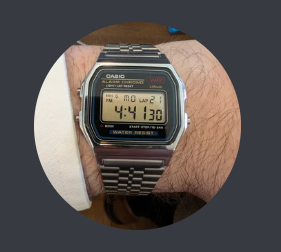
My techy friend had an old Casio watch just sitting in a drawer. So he ordered a kit from OlleeWatch to turn it into a smartwatch.

The fun is in the tinkering, he says. But it’s dead simple. You just take out the guts of your old watch and swap in the new. The OlleeWatch counts your steps, measures your heart rate and takes your temperature. It plays black jack and Ping ball, and includes a timer, a stopwatch, a flashlight and more. You can change the backlight color, add a custom name to the screen and choose from various watch faces, apps and alarm sounds.  But my friend says he has to use the OlleeWatch app on his phone once a day to keep the clock from slowing down.

On the other hand, its battery life is impressive. The OlleeWatch can go 10 months without needing a new coin-sized battery, or up to three years with motion sensing turned off.  The $55 kit is compatible with the Casio F-91W, ($21 on Amazon) and the Casio A158W, ($30 to $85 for the gold version). A fully-assembled OlleeWatch is $99. Watch the setup video at OlleeWatch.com.

App Happy

The tech repair service, iFixit, now has a new app, “FixBot.” Just tell it what’s wrong with your phone, computer, phone or tablet. Besides those gadgets, it can help you fix game consoles, cameras, drones, cars, trucks and household appliances. The FixBot app pulls info from thousands of repair guides and user forums. It also links to parts at the iFixit store. No user account is required, and it doesn’t collect personal data. 

Worst Internet Scams of 2025

Mashable.com did a run-down of the biggest internet scams of the year, all of which come in by text. Look out for those that mention the DMV, crypto currency, job offers, inflation refunds, retailer deals, Facebook, wrong numbers, IRS, romance, and Black Friday. Other scams include fake tech support and cloned voices. If you think it’s a voice from your relative but aren’t sure, call them directly.

Internuts

– Scientists Turned a Mosquito’s Bloodsucking Mouth Into a Tiny High Resolution 3D Printer.” Search on that phrase to learn why scientists at McGill University think that a mosquito’s proboscis is better than an $80 3D printer tip for building scaffolds that can host living cells. These scaffolds could be used to regenerate damaged tissues such as skin, cartilage, or bone. They could also help build replacement organs, such as kidneys or livers, form new blood vessels and test drugs.

– “Smart Vacuum Companies Are Monetizing Maps of Your House.” Your smart vacuum may be doing more than mapping your house. It may be spying on you. According to an article in ZME Science, many vacuums send these maps to the manufacturer.