
CHANGING PHONE SERVICE AGAIN
Given that I went to five colleges, it’s not that surprising that I switched phone services four times in four years.
I would never have left Tracfone but for a mighty snafu. When I got tired of using an ancient iPhone, I had the clever idea of moving my Tracfone SIM card to an Android phone without mentioning it to Tracfone. A year later, my account disappeared. So one day, I was left high and dry without the means to summon a Lyft. Though I couldn’t complain after 12 months of free calling, Tracfone’s tech support couldn’t figure out what to do with me, so I moved on. I think their support is better now.
After AT&T and Xfinity, I chose Consumer Cellular. I was overjoyed at first, but started getting dropped calls every darn day.Turning back to Tracfone, I hoped they had forgotten about my previous snafu. Sure enough they had. I’m not getting dropped calls anymore and my best friend says I sound better on the phone. Tracfone is owned by Verizon.
Gotta love that Tracfone pricing. I’m getting 10 gigabytes with unlimited talk and text for $20 a month. Any gigabytes I don’t use each month go into my Tracfone piggy bank for later.
Getting Away from AI
“The only sane people I know are me and thee, and sometimes I wonder about thee.” A friend Googled that quotation to be sure he had it right.
To his surprise, Google’s artificial intelligence chimed in like a worried psychologist. “If you’re riding solo today and need a break,” it said tactfully, “you can track down local sanity-saving spots.” After naming some, it ended with “Cheers to the select few who still have their heads on straight!”
“Note that I didn’t ask for any of this,” my friend said. “I just wanted to be sure how the saying went. I tell ya, this thing is trying to be too cozy. There’s something creepy about it. I don’t trust it.”
A great alternative is StartPage.com. It’s a privacy champion, and offers the traditional links, instead of AI. Use it on your computer, or download the Startpage phone and tablet app. DuckDuckGo is big on privacy too. They include an AI answer called Search Assist, but it’s less touchy-feely than Google’s version. Another great choice is Berlin-based ecosia.org. It gives you search results generated by Google and Bing, but no AI, unless you click “AI Chat.” Even better, it has its own solar plants, producing what it needs for its searches and selling the rest, and it’s planted over 250 million trees.
Forever Chemicals
“Forever chemicals” have been around since the 1940s. They’re “forever” because they don’t break down in the environment and can accumulate in the human body. Scientists call them “Per- and polyfluoroalkyl substances” or PFAS.
But here’s the big breakthrough. Scientists have successfully used generative AI to help design materials from scratch that could remove these chemicals from our drinking and industrial water. These super materials are called “Metal-Organic Frameworks,” or MOFs.
Kemira, a chemical solutions provider, and CuspAI, an AI materials science company, are working together on this. In just six months, their AI platform was able to search through 300 trillion possible structures to provide over 5,000 possible designs. From there, they were able to narrow down the possibilities to about 20 priority candidates. The project is now in the testing phase. The new AI-driven materials have been designed to better pinpoint PFAS and remove them. Hopefully forever.
Free Cell Phone Service
You can use a cell phone for free if you turn on WiFi calling in settings and stay within WiFi range.
It’s easy at college, because the campuses are blanketed in WiFi. Students can Facetime each other without having to head back to the dorm. Also popular is “WhatsApp.” For setup, you would just need to borrow a friend’s phone temporarily. Once you’ve verified the six-digit verification code they’ll text you, you won’t need it again.
Yes, it could be scary when you’re out of WiFi range. A smartwatch, such as the Apple Watch SE, around $109 on Amazon is a great alternative. It can have its own phone number, but once again, you’d need to borrow someone’s phone number during setup. To make a call, just tap an app, or press the side button in an emergency.
US Mobile has the cheapest standalone smartwatch plans: $6.50 a month if you pay $78 up front. T-Mobile and Verizon smartwatch plans are $10 a month. Better Roaming offers a $9.50-a-month plan for Apple Watch only. With all, you get unlimited text and calling, plus access to the internet.
AI Map
How much will AI affect your job? Find out with the new “AI Labor Exposure” map from MIT.
The areas in fiery red, including Boulder, Colorado, Ithaca, New York and San Jose, California are considered the most “AI Exposed.” MIT scientists say that, in the US as a whole, AI could do the work of 18 million workers earning $1.4 trillion in wages, assuming AI completely replaces those tasks rather than just assisting workers.
But would that be as bad as some fear? What will happen to all the money that companies save by using AI? They could use it to hire humans for jobs we can’t even conceive of now.
Filed under: AI, environment, phones | Comments Off on CHANGING PHONE SERVICE AGAIN
 Some lawyers abuse AI, by allowing it to cite fake cases. But BrentWorks has a solution.
  Car Doubles as Drive-In Theater
 Photo Display for Your Fridge

 If I wanted to watch “Paddington” or “The Age of Innocence” I could rent them for $4 each. But “Howdy,” a new channel on Amazon, includes both these movies plus around 10,000 hours of ad-free entertainment for $3 a month. This includes films from Lionsgate, Sony Pictures, Disney Entertainment, Warner Bros. Discovery, and FilmRise, along with original titles. I saw lots of romantic comedies, action films and kid flicks.
 Five-dollar chocolate bars and $15 bottles of olive oil. What gives?
 Becoming SuperFluent
 Ping Pong Playing Robot
 Airbags for Bikes
 Internut
 Like me, you’ve probably seen buildings that have been empty for years. “Why hasn’t something replaced the old Panera Bread store?” I’ve often wondered. Fortunately, AI is solving this problem.
 Monitoring Blood Pressure on Your Watch
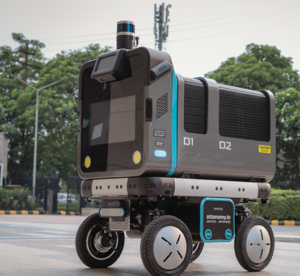 This is amazing. Robots and drones are now delivering medical supplies and specimens. Ottonomy provides the robot.
  Increasing Your Energy
 App Happy
 Recently, a woman told me she was looking for her biological father. “I think your husband, Bob Schwabach, is related to him,” she said. She needed to know the name of Bob’s father.
 Internut