
THE ULTIMATE CHATGPT BOOK
 I love “The Ultimate ChatGPT Prompt Book” by Igor Pogany. It’s both fun and serious. The author has lived in six countries, speaks three languages natively, has 30 million views on YouTube and over 400,000 followers.
The Ultimate ChatGPT Prompt Book offers 750 examples of questions or commands you can use at ChatGPT.com, all of which have been tested by experts, from practical to funny. I found myself tweaking every single one, just as it encourages you to do. In the “Excuses” category, for example, I typed: “Write something funny and short with an absurdly implausible reason for not going for a walk with someone you find boring.” It came back with: “I’d love to walk, but I accidentally agreed to watch a sourdough starter that’s showing signs of intelligence.”
The book is organized into categories. The biggest is “Life,” followed by “Career,” “Personal Writing,” and “Creativity and Fun.” Among the 37 prompts in the Life section, you’ll find suggestions for travel itineraries, relationship advice, predicting the future and designing a budget. Under “Personal Writing,” there’s a prompt for writing video scripts, creating worlds, making up songs and more. Under “Creativity and Fun,” I like: “Discover Ridiculous Questions.” For example: “If marriage required a themed uniform, who chooses it—and how often can it be changed?”
The Ultimate ChatGPT Prompt book won’t be out until January 13, 2026, but you can preorder it from Simon & Schuster and elsewhere for $16. The Simon & Schuster site offers a free monthly e-book.
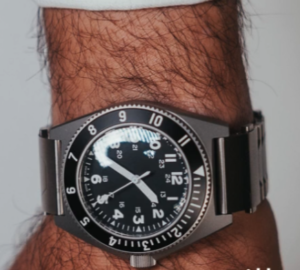 Smart Watch and Rolex in One
Get that Rolex out of your sock drawer. Now you can wear it on the outside of your wrist while your smartwatch rests on your pulse. The $420 “Smartlet,” has slots for both. Flip your wrist to the underside when you want to take calls, receive text messages, see your step count and do other smartwatch stuff.
The Smartlet will be announced at the 2026 Consumer Electronics Show in Las Vegas, but you can preorder it at smartlet.io. For the pulse side of your wrist, there’s a slot for the Apple Watch, Samsung Galaxy Watch, Google Pixel Watch, Garmin watch, Fitbit or Whoop. For the outside of your wrist, you can use a Rolex, Omega, Tudor or TAG Heuer.
Of course, wearing two watches on one band adds at least a third of an inch to the underside of your wrist, a CNET reporter noted. Too bulky? Perhaps.
Speeding up a Slow Computer
For years, I’ve recommended the free version of CCleaner for removing files, cookies and other junk from your computer. But CCleaner’s Version 7 caused me so many problems, I downloaded an older version. So did my techy friend. Unfortunately, by the time I did it, Version 6 had been tweaked to automatically upgrade to the intrusive Version 7. Even CCleaner admitted they’re getting lots of complaints.
So I typed this question into the search box at Copilot.com: “CCleaner has gotten too intrusive. How can I do everything it does without using it?” It gave me simple-to-follow instructions.
If you’re only interested in a speedier computer, skip the privacy tasks. You can do the rest in a three-minute monthly routine. The first step is the real speed booster: Type “startup” in the Windows search box in the lower left of your screen. Now click “Startup Apps.” Toggle the switch to off next to anything you don’t need running in the background.
This second step helps if your storage space is getting tight. In the Windows search box, type “Disk Cleanup,” and click it when it comes up. Now check off “Temporary files,” “Recycle Bin,” and “Windows Update Cleanup.” I unchecked “Thumbnails,” because I like to see pictures of downloaded files, and they just come back anyway. Besides, they take up a trivial amount of space.
Third, be sure to restart your computer at least every week or two. Fourth, do your Windows updates whenever prompted. Optionally, type “Windows Update” in the Windows search box, click “Windows Update Settings,” and allow it to update software drivers by clicking “advanced update,” then “optional updates.”
You needn’t clear your browser cache, whether you use Chrome, Firefox, Edge or something else unless your internet experience is getting glitchy. The only other things that make a big difference on your computer speed is the amount of RAM and a solid state drive (SSD). Unless you’re a serious gamer or video editor, 16 gigabytes RAM should be enough.
RemoveMeNow
“RemoveMeNow” is a $120-a-year service that removes your personal information from people-search sites. The company allowed me to test it for free. But two weeks later, 76 removals are still “in progress,” and two require me to hand over my email address and/or my date of birth. According to PC Magazine, the best services are Optery, Incogni and IDX Complete.
Most people don’t need any of those. After all, a removal service can’t remove your data from government records, social media sites, credit bureau data, marketing databases, or anything you’ve posted publicly. But it could make sense for the vulnerable. If my elderly neighbor had used one, for example, she might not have lost thousands of dollars by answering text messages. The first time she lost about $10,000. The second time, she would have lost $100,000 if she hadn’t made it to the bank just before the transaction went through.
Filed under: AI, books, gadgets, security, troubleshooting, wearables