
A FOIL TO FOB THIEVES
Using a radio device, a car thief can unlock your fancy sports car and drive away. Even from 16 to 66 feet away, your key fob’s signal can be intercepted and cloned. The same goes for your low-priced vehicle.
“So why don’t key fobs come with an off button?” an engineer asked me. I told him it’s because car manufacturers worry that if you forget you disabled the system, you might think your battery is dead. Then you might lose a business deal and sue.
But some models do have a way to turn off “Passive Key Entry.” Others offer a fob that goes to sleep when it’s not in motion. In either case, disabling the PKE or using a motion‑sensing fob only turns off the long‑range, hands‑free part of the system. It does not turn off the high-security short‑range signal the car uses to start the engine.
An alternative is a Faraday key fob protector bag, which shields the signal. Amazon and Walmart sell them for around $10. But ordinary car theft is a lot more common than the techy kind.
The Camaro ZL1 is stolen 40 times higher than the national average, though there are fewer of those to steal. The most frequently stolen vehicles are the Hyundai Elantra, Hyundai Sonata, and Chevrolet Silverado 1500.
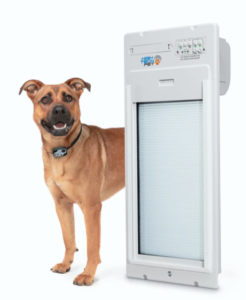 Luxury Dog Door
If your dog hates to board at the local vet even for a single night, consider the Power Pet Roll Up Door. It allows Fido or Fifi to go in and out on their own without their racoon friends joining them. It opens when it detects your dog’s collar transmitter, and shuts as soon as they are through.
A ZDnet reporter says his dog instantly caught on to the idea of a door going up and down automatically as he goes into a sunroom containing his automatic feeder and waterer. From there, he goes through a regular doggy door to a graveled area with artificial grass. That’s where he can do his do-do. Unlike other systems, the roll-up door doesn’t club him on the back when he hesitates. Many dogs with arthritis hesitate to push the flap on a regular doggy door.
Though the ZDnet reporter installed the roll-up door in a sunroom, yours could open up to the great outdoors. Unlike an ordinary doggy door, a roll-up door seals tightly when closed, preventing blasts of cold or hot air from getting in. Find it at HiTecPet.com, starting at around $580.
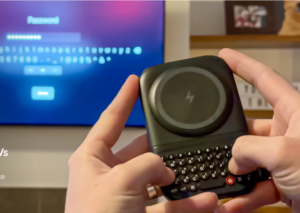 Power Keyboards
What if a phone charger could also provide a physical keyboard for your phone, like the old Blackberry had? That’s the idea behind the Clicks Power Keyboard.
Just pop it on the back of your phone, slide out the keyboard and start typing while your phone is getting charged. The keyboard has a dedicated row for numbers and other handy buttons. Pair it with your TV and multiple smart gadgets so you never have to reenter a password or search for something using an onscreen keyboard. It works with iPhones and Androids even with the phone in its case. Expect it this spring for $109 or preorder it for $79 at Clicks.tech.
The company is also coming out with a $499 Blackberry-type phone with a physical keyboard and special buttons, including one for a light that glows in various colors to tell you whether it’s a VIP message, text or app. When you’re in a text message, you can use the prompt key to record your voice, then release it to send the message immediately. Or you can designate it for other functions, such as voice notes or conversations with Google Assistant. It’s amazingly customizable.
The phone comes with a headphone jack, something I wish my iPhone had, because my wireless headset has a bad habit of disconnecting. It also has expandable storage by way of a microSD card slot.
Checking out E-Books
A reader told me that her local librarians can’t explain how to check out books to read on the Kindle or Kindle app. But it’s easy with the free Libby app.
First download the app from your phone or tablet’s app store. Now search for your library and put in your library card number. After finding a book, check off the box that says “read it on Kindle.” To return a book, audiobook or magazine from the Libby app, just tap the book icon at the bottom of the screen, then “manage loan,” and “return early.” Otherwise it will automatically be returned three weeks after you’ve borrowed it.
Photoshop Inside ChatGPT
ChatGPT now has Photoshop built in. All you have to do is turn it on.
Go to ChatGPT.com on your computer, click your name in the bottom left corner, then choose Photoshop. Now ask for something. I asked ChatGPT to add a Chicago skyline to an ordinary selfie. I also asked it to add New York’s Central Park to the background of a friend’s portrait, but he didn’t like it because ChatGPT brightened his face, making his cheeks look bulgy. But the mini Photoshop has other benefits. For example, it can smooth wrinkles in clothing, fix crooked horizons, crop and straighten, add text to photos, touch up old family pictures and more. It turned my ordinary photo into a wonderful holiday postcard, but took so long I left and came back the next day.