
FINDING A PEN PAL ONLINE
 A reader described himself as “an over-the-hill guy” who remembers having a pen pal in his youth and he liked it. It was great fun, he said, but how would he find pen pals these days? Well …
PenPalParty.com has international pen friends. You can specify adults who speak English, are over a certain age, or use any criteria you like, by going to penpalparty.com/lookforpals.html.
You could also go to favorite websites, such as your favorite newspaper or magazine. If there’s a topic you’re interested in, comment on it and include your email address so people can write you back.
When Joy was in her 20s, she loved the pen pals she met through “Single Booklovers,” which still exists at SingleBookLovers.com. Their motto: “Show me the books he loves and I will know the man far better than through mortal friends.” (Quote is from Silas Mitchell, a 19th century Philadelphia doctor.)
 Facebook is another great way to find people. Everyone who joins gets a Facebook email address. To write someone on Facebook, type their name in the big search box at the top of the screen. When you get to their page, click “Message” and type in the chat window that comes up at the bottom of the page. There are well over a billion people connected on Facebook.
Also consider the seniors site: Stitch.net. As with all online activities, one must be careful. People could be writing from prisons or anywhere. (Remember the old joke: “On the Internet, no one knows you’re a dog.”) However, one of Joy’s friends found a wonderful friend on Stitch.
Here’s an odd approach: One of our friends found a business card in a library book. It had a comment on the book and the person’s phone number. The book was about the history of Persia (Iran) and the card noted he wanted to meet other people interested in Persia. She called the number because it was a new book and she grew up in Persia. It didn’t work out but she had a fun phone conversation. To get better results, he should have put down his email address instead of a phone number.
Hidden Features on Your Phone
If you have an Android phone, search on the phrase “Google camera help” to find some great hidden features. At least they were hidden from us. These are tips for Android 3.0 and up, but they have tips for older phones too. You’ll learn some clever stuff.

The Austrian Alps
- The timer: After you tap the camera icon, notice the tiny picture of a clock in the upper right. Tapping it gives you three seconds to get in the picture. Tap it again and you have ten seconds. The phone actually does a count-down while you get into place. Don’t forget to wave.
- Panorama: After tapping your camera icon, notice the so-called “hamburger” icon (three stacked lines like a bun with something in the middle). Tap that and then tap “Panorama.” You can take a vertical, horizontal, wide-angle or “fish eye” panorama.
- Slow Motion. First, change your phone’s camera from photo to video. On our phone, there are two dots above the button for snapping pictures. Tapping the second dot changes it to video. For other phones, swipe your finger from left to right. Tapping the menu icon (three stacked lines) gives us the slow motion options, as well as photo sphere, lens blur and other settings.
- Take a photo during a video. If you tap the screen while you’re taking a video, you’ll get a snap shot too.
- You can get similar tips by searching on “iPhone camera help.”
Internuts
 JuicyJuice.com is a commercial site with a lot of kids crafts. We made the paper umbrellas that stick on straws to liven up your drink. Sort of a kid’s Mai Tai.
- Hostelz.com lists information on hostels worldwide and provides contact info. It aims to have every hostel in the world. We noticed 137 in London alone. They also list other kinds of accommodations.
- ReadWriteThink.org has links to travel-oriented lesson plans for kids from kindergarten through high school. Example: A “back in time” travel brochure for some ancient culture. (Remember: When in the Roman Empire, do as the ancient Romans do.)
Carpal Tunnel

We get some strange stuff to try out, and this one was a Swedish keyboard, a $70 item from TheHumanSolution.com. The manual required a magnifying glass to read the type and explained almost nothing. At first, every time we typed a “j,” we got a “1,” and we got a zero for the letter “m.” Very weird. We had to call the company to find out the keyboard comes with the numbers lock turned on. Who knew?
To toggle it off, we had to hold down an Fn key and type F11. So the painful wrist or elbow function that the keyboard is supposed to fix is supposed to be because it’s only three-quarters the length of a regular keyboard, decreasing strain on the wrist. The company also sells a mouse in the shape of a pen, but we couldn’t get that to work.
Another suggestion: Try “Mouse Tool,” free software from infopedia.com. When you hover the mouse pointer over something you want to click, it clicks the mouse for you. This helps too.
Filed under: contacts, facebook, Internuts, keyboards, photos, social networks | Comments Off on FINDING A PEN PAL ONLINE

 It’s a very slight increase in the user base, but 7.5 percent is just enough of a bump to attract the bad guys. According to a study by “Carbon Black,” a security firm, the number of malware attacks on Macs was five times greater in 2015 than the previous five years combined. We can expect it to be even greater this year.
 Recently we wrote about one solution to check for incoming text messages. It’s a free program called “MySMS” (SMS stands for Short Message Service), which pops up on your computer screen when a new text message comes in. But you have to remember to start up the program. Now we have an even simpler fix: tweak the settings on your smartphone.

 Joy’s sister recently sent her an email saying: “Look at your text messages.” (She implied, but did not add, “Dummy!”) We’re much more likely to see email on our computer than texts on our phone and Sis knows it. We’re that rare couple who doesn’t live on their phones.
 A reader wrote to say that one day everything was fine on her computer but the next day she could barely read her screen, the font was so tiny. She didn’t know what she did wrong. We told her to hold down the “Ctrl” key and tap the “plus” sign to enlarge the type you see on the web.



 A reader asked us to find her a blood pressure app for the iPhone. There are several of these for both iPhone and Android. Unlike the kind you see at the doctor’s office, the apps do not use a compression band that temporarily cuts off your circulation. They measure the slight pulsing from placing your finger on the phone.
 We have three friends who always go to the Apple store when they have a problem with their Apple equipment. But we said why not call up Apple and get an answer from them? (We can be so “know-it-all” sometimes.)


 We’re going into this again because it seems that all the world wants to get rid of their cable service. Another reader writes to say that he wants to drop Comcast, and short of taking to the streets with flaming torches, he can’t seem to shake them. All he cares about is local channels and HBO.





 Recently we wrote that Uber carpooling was available only in California. Not so, said a reader. He used it in Miami. It turns out that Uber is now in nine places, including New York, San Francisco, Los Angeles, Miami, Washington D.C., Atlanta, Toronto, Chicago and the whole state of New Jersey.


 Here are some facts on children’s use of their phones.
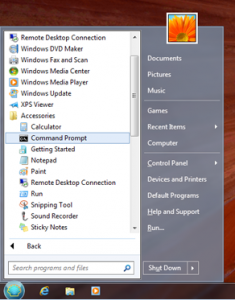
 With Start10 installed, you get the familiar start menu most of have known for years. There on the left is a list of your most frequently used programs and a link to “all programs.” There again are the familiar choices of “Documents,” “Pictures,” “Music,” “Settings,” “Control Panel,” “Shut down,” and “Devices and Printers.”



 A reader wrote to tell us his young daughter got separated from him and his wife during Mardi Gras. Instead of it being a desperate situation, she called and told him where she was. “I found her in short order,” He says. His daughter uses an old LG flip phone with $10 a month service from Kajeet.com.


 Most of the calls to our landline phone are “robocalls” — calls made by a robot. It may not surprise you to know that they want to sell us something. Every second, 963 robocalls are made in America according to YouMail. That’s 2.5 billion robocalls in March alone. For four months, Atlanta has been the most robo-called city.
 complex code to open. It’s called “ransonmware” because the crooks say your files can be recovered if you pay a fee. One time, Joy thought a call was legitimate and after handing control of her computer to the bad guys over the internet, the destruction began. She hung up when Bob urged her to and had to totally reformat her computer. (Joy is really too trusting. Bob, on the other hand, is a cynical reporter.)

 Bob astonished Joy the other day when she was working on a website for a nonprofit. The website pages all had a lavender background, yet their new logo had a block of white around it. How do you give a logo a transparent background, or one that matches the page you’ll put it on? “You can do it in Word,” Bob said, and he was right.

 Joy converted to using a Mac a couple months ago, after her Windows 10 machine became so slow she almost tossed it out the window. Then Bob spilled tea on the Mac (It was an accident! Really!) and the rest is history.
 A reader wrote recently to say that an Android phone upgrade is not always a good thing. After he upgraded to the new Android “Marshmallow” operating system, one of his email accounts stopped working. The only way he could get it going again was to change his server’s security settings to less-than-secure.
 This is an old story we have written about many times for many years. The title of the story is: “Just because there’s a newer version doesn’t mean it’s better.”
