A WORD TO THE FRUGAL

wordA reader wrote to say his copy of Microsoft Office failed and the Microsoft Help Desk suggested he buy a new copy for $150. Of course they would, but …. no need to do that; freebies abound.

“OpenOffice” works great. Basically, it does everything that MS Office does and it’s free. It’s been around since 2000. You can open Word documents, create your own, and save them in the familiar “doc” format. It’s free at OpenOffice.org.

google-docsAnother nice free option is Google Docs from Docs.Google.com. All your stuff is saved online, and from there you can download everything to your computer. If you’re writing a novel, as Bob is, and would rather speak than type, click “tools” and then “voice typing.” Or try Google “Keep,” a free smartphone app. Use it for dictation and send the results to Google Docs, just by clicking “send.” This is the author on the beach approach; it will take down everything you say.

Now back to Microsoft Word: There’s a free version online. Everything you write goes out online, but you can also save it to your computer. Find it at office.live.com/start/Word.aspx.

Joy uses Microsoft’s Office 365, for $70 a year, which works offline or on. It automatically saves a copy online, which syncs with her other devices. Bob only uses Microsoft Word for this column, otherwise he finds it too cumbersome and annoying and prefers to write with a text editor called Q10. There are dozens of these text editors, so pick and choose as you like.  Dark Room is another one he likes.

Smart Shopping

shopping-onlineOver 54 million Americans pay $99 a year to get free two-day delivery on Amazon, as well as other perks. But there are additional tricks to being a wise Amazon shopper.

Take a look at their outlet store. Where it says “all departments” in the drop-down list, choose “Amazon Warehouse Deals” to see used and refurbished products. But watch out: Sometimes the supposed good deal is nothing special; we saw a used Playstation 4 for $242, but that was only $27 less than a new one. So, price check everything.

Going beyond Amazon, there’s the “InvisibleHand,” from GetInvisibleHand.com. (A tip of the tam-o’shanter to Adam Smith.) It notifies you of price drops on shopping, flights, hotels and rental cars. The name comes from the famous statement by 18th century economist Adam Smith, who pointed out that the invisible hand of the marketplace does a better job than government in allocating goods and services.

Managing Bookmarks

bookmarkWe tend to accumulate Internet “favorites” or “bookmarks.” After a while, the list is so long, we can’t find anything. Here’s what to do.

In Google Chrome, click on the three dots in the upper right of the screen and choose “Bookmarks,” and then “Bookmark Manager.” Highlight the ones you don’t want and click “delete.” Bob accidentally deleted a bunch he did want, so it’s best to save the list to your machine first. Click the picture of a little gear and choose “Export bookmarks.”

For Firefox, Microsoft Edge, Safari and other browsers, find the bookmark manager easily by searching on the name of the browser and the words “Bookmark Manager.”

Where Am I?

internetIn Kansas City, some mansions are so large, housekeepers get lost. We heard from someone we know there that one puzzled maid was adrift in the west wing and finally called the owner to ask: “Where am I?”  That can happen to Internet Service Providers (ISPs) too. They think they can pinpoint the location of your computer. They can’t. Ours says we live in Cicero, Illinois. We don’t. Al Capone liked it there but it’s nothing special to us.

A reader told us that every time he visits HomeDepot.com and similar websites, they peg his computer as located in a town at least an hour away. So if he wants to shop online and pick up stuff in person, he has to change the location they have or take a long drive. Same thing happens to us. It gets annoying. Some people have their location pegged to another state.

Experts have suggested calling your Internet Service Provider and telling them to fix it. That didn’t work for us with AT&T. In fact, after being connected to a help person in India and following her directions, we temporarily lost all connection to the Internet when they did a reset. We then we lost our TV service and they had to send a technician. He was local.

Our reader’s ISP is CenturyLink. When he called, they said they had one smart guy who could fix it, though they haven’t yet; maybe he was out sick. So instead of the fix, they offered a faster service and a new modem for the same monthly price he was already paying. So it pays to complain now and then and see what they offer. (Yes, we know we’re troublemakers.)

Those Annoying Ads

adsA reader wrote us that he’s saved a lot of money buying his car tires from eBay and Amazon. But now, no matter where he goes on the Web, he gets ads for tires. He says it gets “tiresome.” (People just want to have pun.) There are ways out of this.

On your computer, search on the term “Google Ad Settings.” Uncheck the box next to the word “Personalization.” You can accomplish the same thing on an iPad or iPhone, by tapping “settings,” “Privacy” and “Advertising.” Then tap “limit ad tracking.” On an Android phone or tablet, tap “Settings,” then “Google,” then “Ads.”  Then tap “Opt out of Personalization.”

Bob has his own swift method of killing ads that come up because they’re just following along with some search he did. Those ads usually appear in a column on the right-hand side of the screen. Do the “control” and “plus” keys together to enlarge the display on the screen. Keep doing it until the ads move off screen and out of sight.


A HARD MASTER

Well we won’t make that mistake again; we’ll make a different mistake.

Some readers wrote to say they were confused by our advice on the use of DOS as a quick and easy way to control PC computers. Most readers were not confused, but those who got lost were confused because while DOS, the operating system underlying Windows, is easy to use, it is super strict about grammar. Yet it’s common to type an extra space or key.

All this reminds us of one of C. Northcote Parkinson’s famous “Laws.” That is the one that states: No matter how many times you search for a mistake in your work, the first person to look over your shoulder will see it immediately. His most famous law is that all work expands to occupy the time allotted to its completion. A corollary to that law is that anything left until the last minute will be done in one minute.

Parkinson, by the way, was a British bureaucrat who several decades ago wrote an essay in the Economist Magazine about the way the world, particularly government, actually works. He noted, for example, that while the British Empire was shrinking rapidly, the number of people who worked for the Foreign Office, which was charged with managing that empire, was continually increasing. (Thomas Jefferson, attempting to halt the same kind of bureaucratic problem, complained about “the bloated war department,” which had increased to three people.)

So things do sometimes get out of hand and we got a lot of very pleasant reader mail about our attempt to simplify computer control. One fellow wrote to say he used to program in “Assembly” language, but retired and switched to painting. (He’s pretty good: Take a look at blackwoodart.com.) Then he got a dog, a beagle, and slacked off on the painting. Assembly is what’s called a “low level language.” Not because it’s low class but because it’s very close (nearly one to one) to the instructions the brain chip actually understands. High level languages, like BASIC or C++, are so-called because they are far removed from chip talk.

But we digress, as they say, and must move on.

Plug Me In

hootooShowing off photos on your iPad is fun. But getting them there can be a hassle. We use the “iPlugMate,” a $35 gadget we found on Amazon.

The iPlugMate, from “HooToo,” is a tiny flash drive with two working ends. On one end is a “Lightning Connector” which plugs into an iPad, Macbook, iPod or iPhone. The other end is a USB 3 connector which plugs into a Windows computer. Plug it into your computer to get the photos you want on the flash drive. Then plug the flash drive into your Apple device to transfer them, using a free app. It also works in the other direction.

We tried it with an iPad, a couple of Windows XP machines and a Windows 10 machine and in every case it worked great. Huge photo folders transferred quickly over to the tablet and we of course kept the original photos on the drive as a backup.

Another way to transfer photos is Apple’s free iCloud service. Unfortunately, iCloud doesn’t work with Windows XP, unless you use a techie workaround that was too techie for us. ICloud sers get five gigabytes of storage space, but you have to choose a folder you want to keep synchronized. If you have lots of photos in separate folders, drag them all into the iCloud folder and they’ll stay in sync.

Animate That

MakeaGif.com, a free site, lets you make animations from still photos. If the photos aren’t similar, it will look more like a slideshow than an action shot. The nice thing about the GIF file format is that it loads much faster than a video. So if you put it on Facebook, your friends won’t turn to stone waiting for it.

After adding your photos and clicking to turn them into a GIF, you can add photo captions if you like. Or download it. Or click to get a link and share it in an email or on Facebook and other sites.

Gamer’s Keyboard

ornata-chroma-keyboardThe “Razer Ornata Chroma” is a $99 keyboard for gamers and it’s pretty fancy. We fell in love with the backlit keys, which cycle through all colors of the rainbow. Joy is using it as her regular keyboard now.

This lighting is nice to have when you stumble into the office at night. It’s also good in the daytime if your office is a bit dark. You can customize the colors and display to get various effects. Tap the “fire” effect and the keys appear to be smoldering.

The key strokes are short and spring loaded. This reduces the time between striking and having your actions register, crucial when you’re in a high-speed game. You can give it ten commands at once and its own memory keeps track.

You can assign keys to specific functions for quick and sure action. These shortcuts, called “macros” have been around since the earliest days. When Bob was a reporter for the Philadelphia Inquirer, the copy desk editors had a shortcut key for “Zbigniew Brzezinski,” Jimmy Carter’s national security adviser. Tap a key and Zbigniew was slugged in.

What we have found interesting about this sort of thing over the years is that equipment made for video game players — who always want fast action and lots of options, is often the best of its type (so to speak).

Last Pass

A reader begged to differ on our password advice. We warned against the free version of “LastPass,” because it’s had a couple of security breaches.

There would have been no security problems, he notes, if people had used LastPass with two-factor authentication. Two-factor authentication means that no one can sign in to your account because they won’t have the code that was sent to your phone or tablet. To use it with LastPass, you need a premium account, which is $1 a month. Then click on your account and “multifactor options.”

Besides Last Pass, the reader recommends using 2-factor authentication with all your online accounts. His Facebook account was hacked recently, so he added two-factor identification to it. Search on the phrase “Lifehacker two-factor authentication” for an article with links to automatically enable it on a wide variety of sites, such as Dropbox, Twitter and Gmail. (Many holiday thanks to our reader for supplying this reference.)

To recap the main feature of Lastpass, it saves the effort of writing down dozens of passwords, which in many instances must be changed on a regular basis. You only need to remember one master password, which is not recorded by LastPass. Knowing it unlocks all the others. At least that’s the theory; for some reason, it failed to log us in on half the accounts we have passwords for.


EASILY DONE


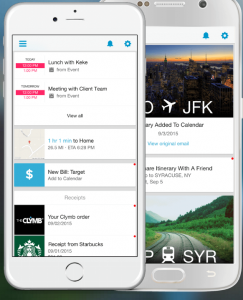
easily-doWe’re using a new email application that keeps you organized through the holidays and beyond. It’s called “Email by Easily Do,” and it’s free for iPhones and iPads from easilydomail.com. As you would expect, an Android version is in the works.

Here’s what we like: It automatically tidies your email, giving you a new inbox with multiple categories. Travel plans, such as airline notifications about your flight, automatically land in one spot. Bills and receipts are in another. Events and entertainment have their own slot. So do subscriptions. We instantly saw all our Amazon receipts going back five months. And it tells you when to expect any packages you ordered and provides their tracking numbers.

As many people do these days, we’ve put ourselves on too many lists. For example, Easily Do unsubscribed us from 75 newsletters in a minute, as we tripped down a list tapping the “unsubscribe” button. There were lots of publications and shopping alerts we had no idea we were signed up for. Some companies must sign you up for these things because you went to their web site and they captured your email address.

Search is lightning fast, which is handy if you misplaced an email. Example: Tap the “trash” category and confine your search to that. Or tap “attachments,” and search there.

To tackle an avalanche of mail, do what all the pros do, including us, (or at least one of us). Create a new email account at one of the many free services, such as AOL, Yahoo, or Gmail. Give that email address to any merchant who asks for it, and you will confine their messages to that address; also give it to people you really don’t want to hear from. Joy has a separate AOL account for this purpose, but it used to be a hassle to have to sign out of Gmail and go to AOL.com to view it; with Easily Do, we see AOL mail when we tap on its tab, but can ignore it otherwise.

Goodbye Cable TV

tv-watchingYet another reader is getting ready to drop her cable TV subscription but wonders about getting sports. We discovered the best: It’s called “Playstation Vue,” and you don’t need a Playstation game machine to use it.

You can use the service with a Roku stick, which is now $30, or the much-more expensive Apple TV, or a Playstation 3 or 4. We’ve just been trying it out on our old Roku stick, and it’s a marvel.

Playstation Vue (or “PS Vue”) is $40 a month, but we think it’s worth it if you no longer use cable TV. Unlike using a plain antenna to catch local channels, it can record shows for later playback.  (The shows are saved on the Internet for 28 days.) The basic service comes with dozens of the most popular channels, including some semi-obscure ones like “Chiller” and “Oxygen.” It’s much easier to find a show with PS Vue than on cable TV. With cable TV and its hundreds of channels, Joy usually gives up and hands the remote to Bob.

“Sling” TV is another way to get sports on TV without a cable subscription and it’s only $20 a month. But we’ve found it to be a frustrating, 1990s-ish experience, full of stutters and stops. Furthermore, it doesn’t record shows. You can only watch live TV. For a comparison between Sling and Playstation Vue, go to GroundedReason.com and click “how to cut cable” in the upper right. There are links to many helpful articles.

With either service, you don’t have to buy a TV antenna. As long as your TV has an Internet connection, you’re fine.  Or, you can buy an adapter, such as the “HDMI to Composite AV Converter for Amazon Fire Streaming Stick.” (How’s that for being specific?) It’s $40 at Amazon. The Amazon Fire Stick, sold separately, comes with its own remote and gives you a variety of Internet channels, similar to the Roku.

Internuts

  • FreeDocumentaries.org has hundreds of documentaries, all free. In the “fact-checked films” category, there’s a” video about farm-raised fish, another about weather, one about the pagan roots of Christmas, and many more. “The 11th Hour,” about the environment, was created and produced by Leonardo DiCaprio. Lots of thought-provoking stuff here.
  • flash-mobWant to spend an entertaining time on the web? Search on “flash mob” at YouTube.com to see an amazing variety of music and dance as surprise performances in public places. One called “Christmas Food Court Flash Mob,” has over 48 million views. Once you start one going, they’ll continue in succession. From Irish airports to Hong Kong, they’re dancing and singing.

  • “18 Secrets to Make Your Food Healthier Without Even Trying.” Search on that phrase to turn up a Reader’s Digest article with great tips. Who knew that poking holes in a broccoli bag will give you 125 percent more antioxidants than a tightly sealed bag? You get more lycopene when you thoroughly chew your grapefruit. And try baking with avocados for oil instead of butter.

 Numbers Report

The fastest-growing categories for online jobs, according to Freelancer.com, are photography, German fluency, and video editing. Those are all up between 19 and 22 percent this quarter. After that comes virtual assistant jobs, “branding,” blog installation, fashion design, photo editing, Amazon web services and Google Adwords. Ja, das ist gut.

To look for work on Freelancer.com, sign up for a free account and then tap the “Work” category at the top of the page. You can browse by category, or look only at jobs that meet your skills. After clicking “projects,” we noticed that this is really a buyer’s market. Employers sometimes pay as little as $20 for a job. However, we saw some photography jobs for $700. Still, it’s almost all home work.

 Books

scratch-programming“Scratch Programming Playground,” $25 from NoStarch.com, and “Coding in Scratch: Projects,” $6, are two books for kids who want to learn how to be programmers.

Instead of esoteric lines of code, kids using Scratch drag colorful blocks into place. A block might ask a tiger to turn around. Another might make him walk three steps. As they get more complex, a child creates games and stories. In “Scratch Programming Playground,” kids make games like Fruit Slicer, Asteroids, Snake, and a kind of Super Mario Brothers.

Kids can play around in Scratch without these books, but they’re helpful. To program in Scratch online for free, go to scratch.mit.edu. To work offline, go to scratch.mit.edu/scratch2download.


DOS IS BOSS


dos-files“I must be old because I still use DOS,” a reader says. He’s not old, he’s smart. It is the fastest, cleanest way to control any PC using the Microsoft operating system. And he gave us some examples of the power.
A bit of an aside to start: It’s often called MS-DOS, for Microsoft DOS. The DOS stands for “Disk Operating System,” and though it doesn’t show up on your regular screen, all Microsoft systems still have it and you can still use it. Back when the world was young and jungle noises ruled the night, this is what we used — and we loved it. When Windows came into general use — mainly to compete with Apple’s graphical user interface — DOS was considered too complex for ordinary users, and was unceremoniously moved to the back of the bus. It’s very roomy back there.

To access DOS, type the letters “cmd” (without the quotes) into the Windows search box. A DOS window will appear. Then type “cd\“ (again without the quotes) into the DOS window to go to the top of your hard drive. You’re in biz.

Example: People panic when an expert tells them they need a new hard drive, our reader says. True enough. They first want to save all their pictures from the old drive. But is this even possible? Sure. With DOS, you can type a few letters, and poof! It’s done. It may sound a little difficult when we describe it, but you will learn to love it.

To save pictures from the hard drive, for example, plug in a flash drive or any other drive and type the following command, being careful to put in a space where there is a space and substituting the letter of your external drive for the letter “K.” The DOS command you would enter is: XCOPY *.JPG K:\ /S  (The “S” part just stands for “subdirectory.” It gets everything from inside folders.)

“Viola!, as we say in fractured French: All of the files you have that end in the letters JPG (which stands for JPEG and is the common file format for saving pictures) are now magically transferred to the drive you plugged in. Another common ending is BMP. Whatever format your pictures are in, you can transfer them by using their three-letter ending.

We tried it and it works great. DOS copied 25,945 pictures in a flash. They came in folders organized by date, and all the folders were inside a larger “Pictures” folder on the flash drive. If you want to know how much space they occupy, type “DIR *.JPG /S” (without the quotes) and go to the last line.

You can use the same command to copy all the documents from your hard drive. Just replace “JPG” in the command above with the letters “DOC?” DOC is Microsoft’s three letter ending for “document.” The question mark adds a wild card, so that all your “DOCX” documents are saved too.

You can delete things you never knew were still hanging around on any drive; you can move things around; you can clean up your hard drive with a single command (defrag) so the system becomes faster; you can copy any number of files and move them somewhere else, and on into the night.

You can get lists of all commands just by typing “DOS commands” in the browser search box. There are lots of sites for this and you can go through a few to see what you like. This is the yellow brick road to the Emerald City

Fun in Virtual Reality

kid-with-google-cardboard-virtual-realityWe just introduced our neighbor’s kids to virtual reality, by way of our $10 Google Cardboard, (available for $5 from KnoxLabs.com). You lay your phone in the cardboard viewer – which are sort of like cardboard goggles – and are instantly transported – if you remembered to first download a decent “virtual reality” app to your phone.

We started by searching on “Kid VR” in the Google Play app store and in the iPhone app store and found dozens of free virtual reality apps. By far the best one we tried is “VR Halloween,” for Android. It puts you on a train moving past Halloween pumpkins and goblins. It was fun and the kids loved it and didn’t care that Halloween was over for this year. NOTE: There are also thousand-dollar virtual reality systems for home users. But what can we say, we’re cheap, and the kids don’t mind.

 Internuts

  • “7 Self-Care Rituals that will make you a Happier and Healthier Person.” Search on that phrase to uncover an article with some unusual tips, including dry-brushing your skin before a bath, to improve circulation and slough off old cells and debris.
  • List25.com has lists, including the 25 worst earthquakes in history. One of the very worst hit Nepal last year.
  • NewYorker.com/cartoons has what we like best about the magazine for free: the cartoons. (Who can read those 20,000-word articles?)

Scanning Photos

“Google PhotoScan” is a free app for turning paper photos into digital images you can store or share online. It worked great in our tests.

To start, take a picture of your printed picture. (Sounds silly but stick with it.) The app asks you to move your smartphone’s camera over a series of four dots that appear on your screen. When you’ve done that, the app has taken a picture of the photo from various angles and has stitched the results together, all in the wink of an eye. The app puts a copy of the photo on your phone or tablet. From there, you can upload it to your private account online. If you need to edit it, just open it in Google Photos, an app that comes with Android phones and can be added to iPhones and iPads.

Besides photos, it worked well on old paper greeting cards we didn’t want to throw away because of the message inside. Paper gets bulky and it yellows.


SOMEONE IS LISTENING


google-homeWe continue our epic struggle with so-called digital assistants. They are small, unassuming, and sit on a desk or table ready to answer burning questions like “Is the library open?” And:  “What’s the weather like?”

Last week, we looked at Amazon’s “Echo Dot.” Now we turn to the “Google Home.” Why do we continue? Because, dumb as they are (so far), these devices are the future and will be in every home and office in fairly short order. They are the edge of the wedge, the Big Kahuna, the sundae with the cherry on top. In short, they are a ton of fun, with plenty of strange quirks.

The $129 Google Home comes with its own speaker, unlike the $50 Dot, which requires you to add your own. Each does a few things the other one doesn’t.

If you have a Google Chromecast, a $35 stick that brings Netflix and other channels to your TV, you can order up videos just by issuing your Google Home box a command: “OK, Google, play Milton Friedman (Nobel prize winning economist) on TV. And there he was, dispelling “five myths about taxes and government.” Next we said, “Play Cary Grant on TV,” and got a documentary. The latest version of the Fire TV Stick add-on is supposed to let you do this with Amazon’s assistant as well, but we we’re a little behind the curve on this.

chromecastListening to music on the Google Home is similar to our experience with the Amazon Dot; in other words, pretty bad. For example: Sometimes we like to listen to a soothing thunderstorm at sleepy time. So we said: “Hey Google, play a thunderstorm.” The box advised us we would now hear ten hours of thunderstorm and rain. Oh, boy. And sure enough, it started up with rain and some great thunder but, but sometime around the middle of the night — too groggy to be sure of the time, but well short of the promised ten hours — we were awakened by a loud rock ‘n’ roll song called “It’s All About That Bass.”

Like the Dot, Google Home can also play podcasts, do math, put items on shopping lists, tell you what’s on your calendar, give you the weather and news, identify famous people, and play games. So, Bob, ever the man to test assumptions, said: “Okay Google,” who is Engelbert Humperdinck?” Google said he was an English pop singer, and nothing else. Right, but wrong, wrong, wrong. Engelbert Humperdinck was a 19th century composer well known for his popular opera “Hansel and Gretel.” The singer took it as a stage name because it amused him.

These digital assistants can also play games. Google’s “Mad Libs” was fun, and likely to appeal to kids. The trivia game posed questions like: “What is 10 times 9?” (Have the public schools really gotten that bad?) A “Crystal Ball” will tell your fortune but warns you not to take it seriously.

Google Home can give you recipes. We asked “How to make bread?”  and she said mix flour, water, yeast and salt, without telling us how much of each ingredient. That was it. You mean, we just eat the gooey stuff in the bowl? No baking? Joy asked “How many calories in a turnip?” (She had just bought one at the local farmer’s market. Turnips don’t have many calories as it turns out.)  “How far is it to Cleveland?” (And are we there yet?) We asked her how many Republicans are in the U.S. Senate. She answered “54 Republicans and 45 Democrats.”

Some readers have privacy concerns with these products. If you say to the Amazon Dot, “Alexa, how do I dispose of the body?” she says you should take it to the police. Google Home tells you to place it in a container of sulfuric acid, being careful not to use a container the acid can eat through. Ask either device to add heroin to your shopping list, and they’ll do it. They seem to be always listening, but they only record what you say when their name is called. Some worry these records could be subpoenaed or a hacker can tune in and listen to whatever you’re saying. If you worry about what she’s recorded, just check the Alexa or Google Home app on your phone. Everything you’ve asked her for is there, but no other conversation. If you’re worried about being spied on, just turn it off. Press the device’s “mute” button and it will stop listening to such subversive talk.

There’s also a concern that some stray child, or party guest, will use the ordering feature on Amazon to order a bunch of products you don’t want. We can’t imagine that happening more than once, since you can return anything at no charge. There’s a complete list of both the Google Home commands and the Amazon Echo (or Echo Dot) commands on CNET. Just search on “complete list of Google Home commands,” or “complete list of Echo commands.” Another way to find out what these digital servants do is to download their free companion apps on your phone.

Internuts

  • lighter-worldSearch on the phrase “200 Powerful Words to Use Instead of ‘Good.’” Food might be “luscious,” “unusual,” or Bob’s favorite when he wants to be polite: “Interesting.” Your work might be “fruitful,” a performance might be “masterful” and a book “spell-binding.”  If you look up “200 words for ‘said’,” you can find 200. “He cackled,” “she prattled,” “they dribbled.” But we suggest sticking to “said.” People who write using a Thesaurus always read like it.
  • Lighter.world offers recipes, grocery lists and meal plans from 56 leaders in the “plant-based” food movement. These include Michael Greger, M.D., author of “How Not to Die,” as well as activists like the wife of former talk show host Jon Stewart.


BACK TO THE PAST

Polaroid cameras still exist. You know, the old cameras that gave you instant prints. Well, sort of instant. Now they’re new again, recreated by Polaroid, and they cost about $100.

Fuji Film has also recreated the instant camera, small and looking quite different, and for about half the price. As you might expect when a product is cheaper and better, it is selling strongly. In fact, it is the best-selling camera at Amazon.com.

What is the point of all this when you can take a snapshot with a smartphone and have it instantly posted to web sites around the world? Well, the instant photo prints from one of these camera are private. That is to say, they come sliding out of the camera and there is only one. It seems like a small advantage, if indeed it is an advantage at all, but it appeals to enough people to make the Fuji Instax, Mini 8, camera a best seller.

It can be the focus (sorry about that) at parties. Joy had the idea of taking individual photos and sticking them on the foreheads of party guests to see if they could guess who they were stuck with by asking others for clues. We took one of the new “Polaroid Snap” cameras to a party and quickly learned that any games could be ruled out since it took several minutes to prepare and print each picture. Pretty boring.

The prints have adhesive backs and can be stuck on a refrigerator or a child’s toy or a student’s school books for identification. Maybe they could be used to make fake IDs.

Joy liked the poor resolution on the Polaroid Snap because it made her look younger;  no wrinkles show at this level. The newer model, the Snap Touch, has a higher resolution and a viewer, so you can preview the picture before you take it.

Polaroid Snap photo paper costs $13 for a 20-pack. Fuji film packs cost about the same, depending on whether you buy them in three packs or five packs at a time. The newest Snap Touch camera, however, can also act as a printer: you can send your smartphone photos to it.

The Numbers Report

By next year, 75 percent of all web browsing will take place on smartphones and tablets, according to media buying agency Zenith. That’s only a slight increase from this year’s 71 percent, so that’s the way things are going, folks. By 2018, Zenith predicts, mobile advertising will hit $134 billion, more than newspapers, magazines and outdoor advertising combined. EEK! Of course, as Will Rogers liked to point out: It’s always risky to make predictions, especially about the future.

Casting Around

woody-allen-cafe-societyWhat if you’re watching a movie on your phone, tablet or laptop and want to see it on your TV? A $40 Roku stick can send it right over. (The Roku also comes with hundreds of channels, including Netflix, Hulu, Amazon and YouTube.)

When you’re watching a video on your phone, look along the bottom for a tiny square with some curved lines in the corner. Tap on it and whatever you’re watching on your phone will be transferred to your TV via the Roku stick. This is what Google’s “Chromecast,” a similar stick, became known for.

A free Roku app for your phone or tablet makes things even easier. Instead of using Roku’s included remote control, you can use your phone. If you search for a movie or a movie star on the remote, it’s a bit clumsy; you have to tap letters one at a time on a keyboard display on your TV screen. With the phone, you can speak the name into the microphone. We said “Vin Diesel,” and got a dozen of his movies to rent or buy.

We next said “Café Society,” a new movie from Woody Allen, and were prompted to add the “FlixFling” channel and rent the movie in high definition for $6. We first had to create an account at FlixFling.com. This is a bit tricky. A big ad asks you to start your free trial by adding a credit card. If you forget to cancel, they’ll ding you. But if you click “no thanks,” and then click “on demand” movies, they’ll ask for a credit card but won’t charge it unless you order a movie. Having done all that, we got the movie.

For some reason, casting movies from the computers in our office to the TV in our living room, didn’t work well. When we tapped the “cast” icon on a YouTube video, YouTube showed up on our TV, but not the video we were watching. When we used our phones or tablets, it worked fine.

Reader Concern

A reader wrote to tell us that her friend uses a password program she loves, called “LastPass.” She didn’t feel comfortable using it and wondered what we thought. We’re uncomfortable too.

In the last few years, we’ve seen at least two reports of software vulnerabilities in LastPass. The most recent occurred this summer. LastPass gives you one master password that unlocks all of your accounts. We don’t know how the bad guys break in, but why should you have to worry about it all?

Non-Stop Power

cyberpower-uninterruptible-power-supplyOut of the blue, CyberPower sent us an uninterruptable power supply, the $110 CyberPower Mini Tower. It’s heavy, and there it sits, unused for now.

On Amazon, 1,969 people gave it rave reviews.  Its main aim is to prevent data loss and protect home entertainment systems. (This reminded Bob of visiting the U.S. Virgin Islands, where power outages occurred almost every day. As everything went dark, some locals would say wryly: “Ah, another day in paradise.”)


I DREAM OF GENIE IN A HOCKEY PUCK

Amazon Echo Dot

Amazon Echo Dot

The “Amazon Echo Dot” is a small $50 box with a genie named Alexa. You ask her to play music, and she plays music. You ask about the weather, she tells you the weather. She even tells you what’s playing at the Bijou, or wherever.

It is absolutely the future, though it’s sometimes like dealing with a drunken monkey. “Google Home,” a similar device just arrived. But the future is still struggling toward digital Nirvana.

Alexa responds to voice commands. We ask her to play Bach, she plays Bach. Though oddly enough, there is a popular French album of cool jazz, called “Play Bach,” which Amazon actually sells, and we actually bought. But Alexa ignores that and plays Bach’s “Toccata and Fugue in D Minor,” which is the most perfect ever Halloween music. But for reasons known only to the mind of a digital assistant, part way through, it switches to playing Debussy’s “Prelude to the Afternoon of a Fawn.” Nice, but not Bach.

Nothing ventured, nothing heard. “Alexa! Play Beethoven.” The ever obedient if somewhat addled Alexa responds with Tchaikovsky’s “Swan Lake” ballet. Well, she’s very young and probably just listens to Rock.

What we got here is something that looks very much like a thick hockey puck. Inside is a personal assistant that’s like “Siri” for the iPhone or “Google Now” for Android, but more, and more fun too. We plugged in a couple of good quality Altec-Lansing speakers we got for $20 on the web. Sound is great.

Once Alexa is set up, she’s always on. She connects through Wi-Fi and does your bidding, more or less. She can even play games with you, like word games, Jeopardy and Twenty Questions. She’s terrible at them, so you’re likely to win all the time. Joy likes her seven-minute workout. She even took her to a friend’s place, along with a portable speaker. Worked fine.

Back to music: You can say “skip,” “pause” and “resume,” and she’s always ready to play. In her million-song library, she didn’t have “Diamonds are Forever,” the theme from an old James Bond movies, but for an extra $4 a month we could expand our choices to 30 million songs, so we said “sure.” We moved on to old folk songs, like “John Henry Was a Steel Driving Man,” and “You Load Sixteen Tons and What Do you Get?” Alexa can read you a book, or a children’s book for the kids. She can order a ride from Uber or Lyft. You can also ask her to “Find my phone,” and she will if it’s on.

Bob’s imagination took off. Think of the protection possibilities, he mused. Some bad guys break into your house — or your business, and you say “If you don’t leave immediately, I’ll call the police.”

“Sure, sure. they would say. Just stay where you are and tell us where you keep the dough.” But it’s too late. The call will already have taken place, triggered by your voice saying “call the police.” Because, of course, the digital assistant is always on. Future versions need only add the ability to make phone calls, just like your cell phone. In fact, such a phone already exists. It’s called “Ooma,” and is a competitor to “Vonage” and “Magic Jack.” You can say, “Alexa, use Ooma to call Mom.” A little web searching will tell you all about it.

You can connect the all-knowing hockey puck with a security system like “Scout” from ScoutAlarm.com, but it doesn’t yet do everything we’d like it to. Still, Alexa is learning new skills every day, and it won’t be long before Alexa can order photos of the bad guys sent to the police, and everybody on Facebook for that matter, including the time and date stamp. The only escape for them will be moving to the Hindu Kush.

The Amazon Dot, second version, with Alexa inside, is less than a third the cost of their original product, the $160 “Amazon Echo.” Plug your own speaker into the Dot. We have seen the future, and it looks like a hockey puck.

Internuts

  • lazy-bandA frequent correspondent sent us a link to Wimp.com/brassband. It has a video of the laziest brass band in the known universe. Very amusing.
  • “Girl Speaks 20 Languages.” Search on that term to see an amazing video on YouTube. The 20 languages include lesser known ones like Sami, spoken only in parts of Norway, Sweden, Finland and Russia. She speaks fast, like a native, whether she’s speaking German or Tamil, the official language of Sri Lanka.
  • “33 Roald Dahl quotes.” Search on that phrase to find thoughts that will “inspire you to live like a kid again.” (Dahl is the author of many children’s stories, including Charlie and the Chocolate Factory.) It’s one of the many pages in ThoughtCatalog.com.


Private Web Searches

20-languagesIf you use StartPage.com, all web searches will be private. Click on the word “proxy” next to any search result to have the website address encrypted. Your results still come from Google, but you’re not tracked. DuckDuckGo.com is similar, and a favorite of many of our readers.

Alternatively, you could use Google Chrome’s “incognito” mode. Hold down the “ctrl” key in Windows (“cmd” on the Mac), and tap the shift key and the letter “n.” Not only are you un-trackable, but your searches won’t show up in a history of where you’ve been. Of course, incognito mode has limits. Some sites require you to have “cookies” turned on. They won’t operate if they can’t collect information about you in incognito mode.


IT’S ON YOUTUBE

goodnight-goonYoung children love to hear the same story over and over. Our dental hygienist told us what she does to keep from going nuts. She calls that old story up on YouTube.

So we searched on “Goodnight Goon,” a Halloween classic. Our dental hygienist had been reading it to her two little boys every day for a year, until finally she called it up on YouTube. This was definitely the right thing to do. Because whatever the story, there’s someone reading it aloud.

Be specific in your searches: We searched on “Cat in the Hat read aloud” and there he was. There were several readers and they all showed the pictures in the book; one had half a million views. You can subscribe to a channel such as “Reading Pioneers” to find out when they post a new one. But you are not limited to children’s stories, not at all. You can have Gone With the Wind read to you, or War and Peace. They’re both guaranteed to put us to sleep.

But as they say on late night TV commercials: “That’s not all you get.” We turn to YouTube when we don’t know how to do something. Every time we get a new product, for example, we go to YouTube to see the set up and get tips on operation. You can find set-up and user demos on just about anything: vacuum cleaners, can openers. drones, new TVs with impossible to figure out options, and on into the night.

We also go there on health matters. We recently searched on “how to put drops in your eye,” for example. It was surprisingly instructive. Joy’s disabled friend Nancy needed eye drops four times a day, starting two days before her cataract surgery. But every time Joy tried to put the drops in, Nancy involuntarily closed her eyes. YouTube explained how to do it:  Put a drop in the corner of a closed eye and let the person blink it in. Or have the person hold down their lower lid while you lay a drop in there. It turns out that only the pupil is sensitive to touch.

Tough Going on the Fitness Front

fitbitDo Fitbits and other wearable devices make you exercise more? According to the Journal of the American Medical Association, those who use step counters and other trackers actually exercise less. We find this hard to believe, but it’s backed up by Lancet, another prestigious journal. Their reasons? The constant monitoring either makes you discouraged or complacent.

One out of five Americans has one of these things. Joy, who has a normal pulse rate of 44 and needs no fitness training, has tried several. Before she lost it, her favorite was the “Vivofit” from Garmin. It shows a red line across its tiny screen to tell you you’ve been sitting too long. But it also tends to pop off if you wear it on an ankle, which is how Joy lost hers.

Secret Email 

What if Hillary Clinton had used encrypted email? Would she have avoided the great bugaboo of her campaign?

Naturally enough, that’s what the people at “StartMail” say. It’s a $60 a year encryption service. The company doesn’t respond to requests for information, even from the U.S. government.  It’s based in Holland, where U.S. data collection methods do not apply. They say they have never cooperated with the U.S. National Security Agency, and unlike many free services, they themselves cannot read your mail.

StartMail allows you to send unreadable email that becomes readable when the recipient answers a secret question. All they see at first is your name and the subject line. Your “sent mail” folder is also encrypted. The service saw a surge in membership after Yahoo recently admitted that 500 million email addresses were hacked.

Internuts

  • 2016-electionEconomicNoise.com was suggested by a reader. Search on the word “paraprosdokian” (we know: hard to believe) to find funny examples of sentences with a twist ending. Example: “If I had a dollar for every girl that found me unattractive, they’d eventually find me attractive.” Or “I was going to give him a nasty look, but he already had one.” And our favorite: “If I agreed with you, we’d both be wrong.”
  • BallotReady.com gives you a complete ballot with links to information about all the candidates. Just put in your address. If you live in California, the results are insane.
  • Search on the phrase “hidden Roku tricks” to find PC Magazine’s article on how to get the most out of your Roku, a streaming media player. We like the idea of putting a movie or favorite actor on your watch list. Select “My Feed,” and then search for the one you want to add.

App Happy

  • movies“Itcher” is a free iPhone/iPad/Android app for deciding what movies to watch, what books to read, what music to listen to and what games to play. Start by rating five things in each of those categories. If you make a mistake, you can undo your rating. We accidentally rated a Beatles book highly and got too many Beatle book suggestions. So we tapped on our rating to undo it.
  • “Loop by Seedling” is a free app for iPad/iPhone for looping photos together in a non-stop animation. Their sample video shows two stuffed animals playing tic tac toe. We tried to make a bunny appear to be throwing a ball. The movie business need fear no competition from us.

The Streaming Blues

Our friend was all set to enjoy a live streaming event on the Web when a screen message asked her to install an updated version of “Adobe Flash.” We showed her she can avoid this sort of thing by using Google Chrome instead of Internet Explorer or Firefox.

A year ago, Google execs got so annoyed with Adobe Flash software that they started blocking it. (Interestingly, Steve Jobs felt the same way about Flash and banned it form Apple.) Websites now must use a different kind of video player if they want their content to be seen. So you don’t need Flash to watch a movie or video on Google Chrome. If you do use Adobe Flash, keep it updated. Hackers can take advantage of older versions.


EASY BACKUP

windows-10To be sure your important files are automatically backed up, turn on a feature in Windows 10. This is pretty handy and here’s how to get it.


Click the “start” button. Then choose “settings,” by clicking the gear off to the left. Now choose “Update & Security,” and then “Backup.” Plug in a thumb drive or any kind of external storage device. Click “add a drive” and choose the one you just plugged in. You’ll now see a list of folders that will be automatically backed up. Click on any you don’t want and choose “remove” to remove them. Click “add a folder” to add the one you do want.

Avoiding Hackers

hacker Hotel and library computers are easy to compromise. In short, they’re generally not safe from hackers wanting to steal your information or your identity.

We used a hotel’s “business center” computer a while back at L’Auberge in Del Mar, Cal., a three-star hotel, no less, and within a couple of days started getting scurrilous ads in our email, some really filthy stuff. At the “Conrad” in Indianapolis, one of Hilton’s upscale hotels, we noticed the computers in the business center had not been upgraded in more than four years, and did not seem at all well protected. Joy installed the latest Internet Explorer. She shouldn’t have been able to install anything.Preview

Almost no computer that can be accessed by the public is safe from someone installing the kind of software that logs your keystrokes – every letter and number you punch in.  So we got pitched recently about a program that encrypts every keystroke you enter.

It’s called “GuardedID,” and sells for $30. It prevents bad guys from doing what’s called “screen scraping,” getting info from your screen even if they can’t capture your keystrokes. It also prevents so-called “click jacks.” These are hidden objects in legitimate ads; you click on the ad and it takes you somewhere else.

OK, so whether you add GuardedID to your anti-virus and anti-spyware arsenal depends on how paranoid you are. We decided to install it. We may not need it, but remember: even paranoids can have enemies.

New Printer

epson-xp-640-printerOur laser printer is great for documents and clip art, but not so hot for photos; inkjets have had our best results. So we tried the new $150 Epson Premium XP-640 “Small in One” for photos; the “in one” part is that it comes with a scanner on top. Here’s what we found:

It’s heavy and not small, and $150 seems steep for an inkjet. It was difficult to set up and annoying to use, but  … it produced outstanding photo prints and you could do them 4×6 or 8×10. We were impressed with that. But as the song says, you must remember this: The quality of any print is heavily dependent on the quality of the paper.

High quality glossy paper runs anywhere from 30 cents to a dollar a sheet. You can find some for as little as 16 cents a sheet, but we don’t think it’s worth saving money this way if you plan to keep a big print and frame it. A full set of inks for this printer costs around $48, but of course that’s enough for lots of big glossy prints — anywhere from 50-100 of them.

Compared to having your photos printed at Walgreens or some other store, it’s cheap. An 8×10 photo printed at Walgreens or most other stores, costs about $4. Doing it yourself at home would be less than half that. Frame them and you’ve got some nice holiday gifts.

It’s tempting to save by buying cheaper ink from what are called “third party suppliers.” (Shouldn’t they be called “second party suppliers?”) But of course the printer companies don’t want you to do that and say it will void the warranty; Hewlett Packard recently caused howls of protest when they automatically updated their printer software through the Internet without telling anyone that this would make all other ink cartridges non-operational. They disguised it as a “security update.” Pretty sneaky. Of course, for Hewlett Packard, ink is most of their profit. (By the way, we used to have an HP printer that stopped us from using third party inks. We tricked it by going back to an earlier installation of the software and then everything was fine.)

The cost of ink is so high that even Bob’s doctor recently complained about it. We have purchased ink cartridges made by outside companies and had no problem with it. It did not damage our printer and as for voiding the warranty — who cares? In a comparison test by Consumer Reports magazine a while back, reviewers preferred the quality of the third party inks to the manufacturer’s own brand.

Back to the Small in One printer: Using the Epson “Creative Print” app on your phone or your computer, you can make collages, greeting cards, etc. or post to Facebook or Instagram. In theory. Joy, a world-class greeting card maker, found the card feature baffling.

Bottom line here: The photos were great, but the machine is too expensive and awkward to use,

 Internuts

  • tonights-bedtime-storyTonightsBedTimeStory.com has free books to read or listen to. They have Beatrix Potter’s stories, Jack the Giant Killer and 79 classic fairy tales.
  • Fotor.com offers an easy way to make photo collages, Facebook posts, art for your YouTube channel, greeting cards, banners, and other designs. There are ads along the bottom of the screen, but we found these easy to ignore.
  • Gaming.Youtube.com/PrimeTime is an hour-long, live show about video games. Viewers interact with game creators.
  • NoLabels.org is trying to get Congress to focus on solutions, not party politics. It was founded by a former Congressman, Mickey Edwards, who wrote a book about the problem: “The Parties Versus the People.”


DUDE, WHERE’S MY CAR?


zus-smart-car-charger

Zus Smart Car Charger and Car Locator

Joy broke her foot this summer, but that didn’t stop her from walking for two hours with her friend Betty. Joy was wearing an orthopedic boot but naturally did not complain as the pain increased. It took two hours because Betty couldn’t remember where she left her car.

There are free cell phone apps for this problem, but we have tested several and they don’t work all that well.  We’ve found they can’t compare with a path-finding gizmo called “ZUS,” which is $30. It not only finds your car, it checks the time left on the parking meter and charges your phone.

To get started, we plugged the ZUS into the car’s cigarette lighter and downloaded a free app. The ZUS has two slots for USB cables and claims to charge your devices twice as fast as other car chargers. Could be, but we didn’t care about that; where it shines is in navigation.

We tapped the ZUS app after parking the car and took a long walk along the lake. When ready to head back to the car, we got a green arrow pointing us in the right direction. When we veered to right or left or reversed course, the green arrow pointed us back to the car. It gave us a progress report along the way, showing when we were 750 feet away from the car, right down to the last 20 feet. This last might matter in a crowded parking lot, like at a sports event.

We compared it to a free app called “Find My Car.” (We’re always eager to avoid paying $30.) First we tapped it to set our parked position, then took a walk again. When returning, we tapped “navigate” to get Google Map’s turn-by-turn directions for walkers. But we were practically standing in the lake when a Google voice announced that we had arrived back at the car.

A few other nice ZUS features: You could be lost in the woods — without cell phone coverage, and still use it to track back to your car. It can share its location with family members, so you could all meet up at the car in the Disneyworld parking lot, without trying to remember where it is. On iPhones and iPads, the app also checks your car battery.

Beware Bogus Email

scamWe’ve recently had calls and emails that claim to be from Citibank. The free cell phone app “Truecaller” blocked the call but we still got it on our landline. Much worse were the emails.

The fake Citibank emails look exactly like a Citicard invoice. It even had the last four digits of a credit card we used to have and a precise sum we owed. The return address appeared to be legit too: “citibank.com.” But appearances were deceiving.

Never click to go to a link in a suspicious email. Call the company and ask if they sent it. Or, here’s a trick Joy uses: Instead of using your left mouse button to click on a link like “Visit Citi Online,” click with your right mouse button. This gives you a menu. From the menu, click “copy link address.” Then paste it into any word processor. Sure enough, when we did this, it showed that the email wasn’t from Citibank but some outfit called “AccountOnline.” Totally bogus, man.

Sharing Your Opinions

many-opinionsA reader turned us on to “Opinion,” a free app for the iPhone or iPad. It puts your opinions out there, as a podcast for the whole world to listen to. A podcast is like a personal radio show. You can add episodes as often as you wish, and create as many stations as you wish. By golly, this could be a series.

We first did a podcast ten years ago, using BlogTalkRadio.com, which is still around. It’s a simple way to go on the air just by calling in. Books have been written on how to do a professional-sounding show, but the Opinion app is as simple as it gets, no manual required.

Go to MadeWithOpinion.com and download the free app or find it in your phone’s app store. Then choose a name for your show. We chose “Bob and Joy.” This gave us our own web address, Bob-and-Joy.MadeWithOpinion.com. (Bob was his usual curmudgeonly self.) Tap to take a picture of yourself or use one you’ve stored. We didn’t have many photos on our iPad, so we Googled “how to transfer photos from your computer to your iPad. ” Answer: You connect your iPad or iPhone to the computer, then use iTunes.  When you’re ready, tap the red “record” button and start talking. If you don’t want to share it with the world, you can save it as a private file.

After you talk, you’ll have a chance to edit the results. We left our mistakes untouched, but you can tap on a pair of scissors to cut the parts you don’t want. You can talk for up to ten minutes. We talked for three, following the journalist’s rule of “keep it light, tight and trite.” The premium version of the app is $5 and lets you talk as long as you want. (Remember the rule.)

How will others discover you? You can add yourself to the iTunes Podcast directory.  Do a search on “Apple Podcasts Connect” for instructions.

Reader Warning

google-nowRecently, we said you could add “Google Now” to your old smart phone if it didn’t already have it. “Now” now lets you speak your search terms instead of typing them. It seemed like a good thing but it can cause problems.

A reader said he ran into trouble immediately after installing Google Now. Instead of many screens full of apps, he now had just one page. He tried turning off Google Now, but the only thing that worked was uninstalling it. Fortunately, when he did this, all of the missing apps reappeared.