
WHAT’S UP WITH WHAT’S APP?
My brother-in-law loves WhatsApp for sending photos to his friends in France. Now there’s something new to try.
WhatsApp now lets you enjoy video calls with people who don’t have WhatsApp accounts. It’s much like Zoom, but you get unlimited minutes for free. Only the person starting the call needs a WhatsApp account, and each video call can include up to 32 participants.
Start by sending someone a WhatsApp link, which opens in a browser like Chrome, Safari, or Edge on their computer. Participants may want to open links on their phone’s browser instead, but Meta says it’s designed for computer use. After clicking, you’ll enter a waiting room. The host will admit you when they’re ready.
Like Zoom, WhatsApp video calling lets you share your screen to collaborate, offer a tutorial, read a story aloud and more. To react, use a thumbs up or emoji, or click the raised-hand icon. WhatsApp calls are protected by end-to-end encryption, so even Meta can’t listen.
 Remembering Stuff
You don’t have to buy a tracker to help you remember stuff. If you use Android devices, just say, for example: “Hey Google, remember in ‘Find Hub’ that I put my passport in my desk drawer.” Later, if you’ve forgotten, just call out, “Hey Google, where’s my passport?” and it will tell you. Requirements: You’ll need to make Gemini your phone’s assistant, use Android 16 or later, and have patience. This feature is still rolling out.
Alternatively, on any phone, try ChatGPT. Just tell “Chatty” where you’ve stored your items. Later, ask her to remind you.
Incognito Tracker
Though I could use reminders to find my wallet, I’m intrigued by the Statik “SmartCard Incognito,” $30 from Amazon.com. It looks like an ordinary credit card but has a tracker inside. You can make the tracker sound if your wallet’s nearby. If not, use Apple’s Find My or Google’s Find My Device to see it on a map. According to the manufacturer, the rechargeable tracker battery keeps a charge for 11 months.
Two Tech Tips
An older couple rushed over to me at a big venue to ask: “How can we scan this QR code on our phone when we have nothing to scan it with?” I could tell that the code led to a scam, so I urged them to delete it. But I understood their bafflement. Normally, you point your phone at a menu, theater program or something similar to make a web link pop up. What if you can’t because it’s in an email?
On an iPhone, open the QR code in Photos, long-press it to reveal a link, and tap it. On an Android phone, take a screenshot, open Google Photos, and tap Google Lens. Alternatively, on any phone, open the QR code in Photos, long-press it, choose “copy,” and paste it into the text window in ChatGPT. It will immediately fetch the link.
Here’s another techie tip. To see a personal or handwritten recipe on your Amazon Echo Show, open the Alexa app on your phone and tap the plus sign next to the Message box. Now upload a photo of your recipe or tap the camera to take a picture. Next tap the up arrow to send it to Alexa. Finally, tell your Echo Show: “Alexa, show me my personal recipes.” After choosing one, you may want to ask questions like: “Alexa, what’s a good peanut substitute?” The recipes look great on my Show, all typed up and formatted.
Which AI is Best?
Recently, someone told me they like Perplexity AI better than all the others because it has a feature called “Spaces,” which allows you to group related chats together. But I categorize chats a different way.
I use Microsoft Copilot for recipes, Claude for literary and deeply personal discussions and Gemini for quick answers, directions, politics and art. ChatGPT is great for health and finance questions, since you can link your health records and financial accounts.
To start, look for “Health” or “Finances” in the ChatGPT sidebar and follow the prompts to connect your accounts. You can link supported medical records, Apple Health data, bank accounts and investments. I like to ask questions about my lab results, spending and savings. These features are still rolling out.
 New Alexa Tablet
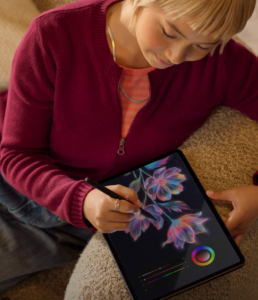
Reading or watching movies outdoors on a tablet can be a bummer in bright sunshine. But Amazon just announced the new $550 Alexa Tablet 12 Pro. It has an anti-glare screen, thanks to Corning’s “Nanomatte.”
Nanomatte technology reduces glare impressively, but doesn’t entirely eliminate the rainbow shimmer seen on matte surfaces, according to The Verge. It does offer great viewing angles, handy if you’re watching a show with friends.
All of Amazon’s new Alexa tablets now run standard Android instead of the modified Android system used by Fire tablets. This gives you access to the Google Play store and its giant app collection. Prices range from $230 to $550. The two less expensive models include lock-screen ads, but you can pay $20 to remove them.
Internut
“Gene therapy can partly restore sight in blind people.” Search on that phrase to discover optogenetics, a groundbreaking medical technique that recently earned a Nobel Prize.
In a small clinical trial, some of those with retinitis pigmentosa regained the ability to detect light and recognize objects or movement, using experimental gene therapy and special goggles.
Filed under: AI, Amazon, apps, how-to, Internuts | Add New Comment »

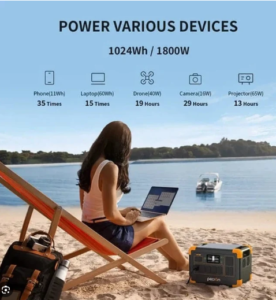 Could a giant rechargeable battery keep your appliances going during the next blackout? A reader named Sheila asked me to find out.
 Shoe Tech
 Robot News
 My late husband Bob tried to get hyperbaric oxygen therapy for his diabetic foot ulcers, but he couldn’t get an appointment. The only center near us reserved its chambers for emergencies such as carbon-monoxide poisoning, decompression sickness, gas embolism, severe crush injuries and certain kinds of infections.
  When an old high school friend reached out to me through
 Internut
 AI finds witnesses

 Fitness Fiasco
 Obsessed with Health Wearables
 Robot News
 Internuts