
APP TURNS SELFIES INTO ART
 Art Selfie 2 is a fun way to see how you’d look dressed for the Italian Renaissance, a Woodstock Festival and a Frida Kahlo portrait, among other settings. I discovered that I look ridiculous in a powdered wig.
Start by downloading Google’s free “Arts & Culture” app for Android or iPhone, then tap on “Art Selfie 2.” The app prompts you to take a selfie, choose a style and save your portrait. I never pictured myself with flowers on top of my head or wearing a hippie’s outfit. Groovy, man. Far out.
Be Real
During a busy day the other day, I went all over town. But every time the “Be Real” app popped up to take a selfie of my activity, I was back home.
Be Real, a free app for iPhone and Android, is an answer to braggarts on Facebook. It posts random photos from your daily life instead of your peak experiences. When a selfie request pops up, you can delay it. But when you share it, your friends will know you waited for a better opportunity.
Each selfie appears as a thumbnail in a larger picture of your surroundings. Mine continually showed my face in the upper left corner of my living room. Nuts. But it seems perfect for parents or grandparents showing off a growing child. So far it’s been downloaded 56 million times. It has 23 million active users, according to ZDnet.
Opening Locked Doors with Your Palm
I love waving my palm to pay at Whole Foods. Soon, I’ll be able to unlock doors that way.
Philips announced a $360 deadbolt that unlocks with palm recognition. It’s called the Palm Recognition Smart Deadbolt, and boy is it ever smart. It opens when you’re close enough to the door handle to have your palm read, and can recognize the palms of up to 50 people. It also reads the pin codes of 100. It comes with a doorbell and an app. The app is great when you’re away from home and need to know if someone is at the door. Too bad it can’t show you their face. Availability: first half of 2024.
That Darn App
A reader said she couldn’t find the free Noonlight app I wrote about. Sometimes, app finding is tricky.
When you search on “Noonlight” in the Apple app store, for example, it’s not at the top. You have to look at the bottom of the screen. Unfortunately, it’s easy to miss.
Noonlight is a free app that calls the police for you and gives them a more accurate location than 911 usually can. It also lets you text a description of your emergency and alerts your contacts.
Remarkable Alexa
“Remarkable Alexa” is a new AI version of Normal Alexa. But so far, only 15,000 testers have tried it, according to Ars Technica.
Reactions are mixed. The test subjects reported both unnecessarily long answers and inaccurate ones. But Amazon is hoping to improve it, then charge for it. Since Normal Alexa is a money-loser, perhaps Remarkable Alexa can help out. According to Business Insider, Amazon lost $10 billion in Alexa-related expenses in 2022.
Going Incognito
Contrary to popular wisdom, using “Incognito mode” in your Chrome web browser doesn’t prevent you from being tracked. It only prevents those in your own household from seeing where you’ve been.
After users complained about this, Google had to settle the issue in court. Now the company is updating their warning about what incognito means. In future it will read: “Others who use this device won’t see your activity, so you can browse more privately. This won’t change how data is collected by websites you visit and the services they use, including Google.”
To use Google Chrome in incognito mode in Windows or the Mac, hold down the “Ctrl” or “Cmd” button and the “Shift” key, then press the “n” key. If you’re using Chrome on an Android phone, iPad or iPhone, tap the three dots, then tap “New Incognito tab.”
Lightning Fast Phone Charging
How about a slim battery attached to the back of your phone or phone case? Sounds awkward, but it would allow you to charge your phone in seven seconds using a device called The Swapery. When you drop your phone into the Swapery’s swapping station, it instantly swaps the current battery for one of four fresh ones.
Unfortunately, it’s not out yet, but you can get notifications by clicking “preorder” at theSwapery.com. They don’t ask for a credit card.
Legal Art
When I went to Bing.com/Create and typed “women around a table discussing finances,” one of the AI-generated images had human limbs that appeared under the table without their bodies. The other images involved clones with similar business suits and identical hair color. The question is, did AI steal those images from copyrighted material? Maybe so. I didn’t end up using them.
Here’s an alternative. Getty Images now offers an AI image generator for creating fully-licensed images. It can generate commercially-safe pictures 100 times for $15. Use it at iStockPhoto.com. I got a great one there.
 Internut
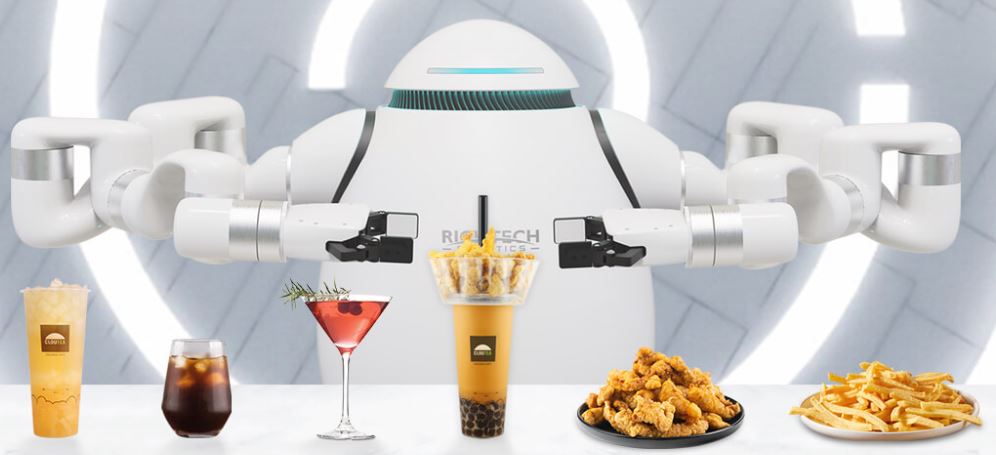
RichTechRobotics.com is showing off their new Adam, a robot bartender and barista. He can pour two drinks at the same time, one with each arm, and even follow your cocktail recipes. Rent him for your next event for an undisclosed price.
Filed under: AI, Amazon, apps, art, batteries, gadgets, Internuts, security