
KARAOKE SAVES THE DAY
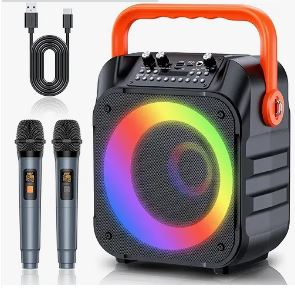 After trying a voice amplifier that screeched, I was on the lookout for something better. I needed to interview a soft-spoken author in front of a large audience.
As I was wondering how I would accomplish this, the soft-spoken author dragged an ancient karaoke system out of her closet. Brilliant idea, I thought. Unfortunately, it was missing a crucial part. So I bought the Moyleaf “Karaoke Machine for Adults and Kids,” a portable public address system with colorful disco lights. It looks like a large black lunch box with a bright orange handle, but weighs only 6.65 pounds. It’s about the height of a piece of paper, not counting the handle. I just saw it for $99.99 on Amazon, though I bought it for less on sale.
Setup was easy. As soon as I put two AA batteries into each microphone, and turned everything on, I was ready for a question-and-answer session. But I decided to try the karaoke system too. Karaoke leaves out the professional singing so you can insert your own warbles. I started by connecting the machine to my phone wirelessly via Bluetooth. Then I chose something from YouTube. Horrified by my raspy voice, I Googled “easiest to sing folk tunes in karaoke.” John Denver’s “Country Roads” came right up, with streaming lyrics. But after trying it, I decided I’d better stick to “Row, row, row your boat.”
Since the Moyleaf works for six to eight hours on a single charge, it would be fun at the beach. But I’m glad it comes with two microphones. I’ll need another singer to drown me out.
Your New Robot Housekeepers
Someday, you’ll tell a fleet of robots to clean the house and put out snacks on the counter, without worrying that they’ll bump into Grandma. It’s part of Google’s “Deep Mind” project.
Deep Mind successfully tested 20 robots working simultaneously in office buildings over a seven-month period. The entire fleet consists of 52 robots, which carried out 6,650 unique tasks.
Vibrating Belt for Stronger Bones
The FDA just approved the Osteoboost vibration belt for anyone with osteopenia, a kind of mild bone loss. It was developed by Bone Health Technologies and NASA, an expert in zero gravity environments.
One study looked at women aged 50 to 60 who were asked to wear the belt for 30 minutes at least five times a week. After a year, those who wore the new belt lost only a half percent of their bone strength. The beltless lost 3.4 percent.
Pre-orders start in a few months. The belt is expected to cost $800 when it comes out later this year. For more info, search on the phrase “Vibrating belt that treats low bone density gets FDA approval.”
Alternatives include Power Plate machines, which also vibrate, and BioDensity machines, which don’t. Power Plate machines start at around $1500 when on sale. BioDensity machines are far more expensive. Both are available through a monthly membership at an OsteoStrong fitness center. I’ve seen fantastic gains in my bone strength after going there for 15 minutes a week for a year.
Hooray for Airplane Mode
Twice recently, I experienced dropped calls. So strange. I was home, with WiFi calling turned on. Why wasn’t WiFi used instead of my weak cell phone signal? Who knows. But here’s how to force a phone to use WiFi: Turn on airplane mode.
Artificially Intelligent Wikipedia
Lately, when I look something up in Wikipedia, the online encyclopedia, I get artificially intelligent options. For example, when looking up the poet and translator Douglas Ainslie, I saw two ways to jump to the meat of the topic. First, I could click on the question: “Can you list the top facts and stats about Douglas Ainslie?” That’s how I found out that he was friends with Arthur Conan Doyle and also the first translator of Benedetto Croce. Next, click on “Summarize this article for a 10-year-old.” That was nice too. You’ll get the same options whatever you search for. Even Albert Einstein’s theories are taken down to the 10-year-old level.
After reading the factual summary and the kid version, you can click the thumbs-up or thumbs-down icon to offer your opinion.
Fun With Google Maps
I never noticed the “Save” button in Google Maps until recently. It’s perfect for armchair travelers who want to put together a vacation plan or remember some place special.
On your phone or computer, go to Google Maps, then type in a location or tap a spot on the map. Tap “Save” when it pops up. You’ll see six categories, including “Want to go,” “Favorites,” and “Travel plans.” Later, when you return to Google Maps, click “Saved” to see your lists again.
 Smart Binoculars

The first artificially-intelligent binoculars, the AX Visio, can identify 9,000 species of birds and mammals at the touch of a button. The binoculars use AI and a built-in camera to compare each image with every possible bird species. Alternatively, you could get a free phone app called “Merlin Bird ID by Cornell Lab.” But even with all this, my bird-watching friend says the best way to identify birds is with a bird book.
Internut
The website Qr.blinry.org tells you how to read a QR code with your bare eyes. It’s a cool party trick.
Filed under: apps, gadgets, health, maps, music, robots, troubleshooting, Wikipedia