
AI PLANNED MY VOYAGE
 I’m planning to go on the “Holistic Holiday at Sea,” a one-week Princess cruise to Alaska. My artificially intelligent friend, Microsoft Copilot, has been so helpful, it practically wished me bon voyage. Now I won’t be unprepared.
I started by asking it about the cabin types, something that both the website and the phone operator were frustratingly vague about. After answering this beautifully, it asked me some questions, encouraging me to get more info, just as if it were my mom or a superior travel agent.
For example, I told Copilot that on my last cruise, when I was 14, I was dreadfully seasick until we stopped in San Francisco for the night on our way to Hawaii from Long Beach, California: “Want to chat strategies to ease that first two-day window until your sea legs catch up?” it said. ”Yes please,” I responded. It told me all about seasick medicine, but when I said that a mold-allergy nostrum with similar ingredients once kept me awake for 24 hours, it suggested ginger chews, peppermint tea, green apples and acupuncture wristbands.
Copilot also gave me a concise packing list, including things I never would have thought of, such as binoculars, a waterproof jacket, and a warm hat and gloves for the arctic outings. (Daily highs will be in the 50s Fahrenheit, with three to eight days of rain, it warned.) Together we went over the pros and cons of a cabin close to the pool, the big screen movie area, the buffets and more, versus a quieter, more stable spot. It then pointed me to cruisemappers.com, which includes exact cabin locations, much like choosing your seat in a big theater.
My travel buddies were impressed when I shared all this and more. “So much great information,” one said. “I’m still in awe of the climate-aware packing list with my hobbies included.” Go to copilot.com, or click its icon in Microsoft Edge, and type a question, to get started.
iPhone Tips
My magician friend said he couldn’t find “Do Not Disturb” after getting a new iPhone with the latest operating system. Here’s how: Swipe down from the upper right corner to get the Control Center. Tap “Focus,” then tap “Do Not Disturb.” This may require patience. It took my friend four tries to get it right.
While you’re in the Control Center, check out AirDrop for sharing photos and stuff.Touch and hold the top-left group of controls, then tap the AirDrop button, which looks like concentric circles, to send photos, files and documents to anyone nearby. Also check out the Control Center’s camera button. Touch and hold it to take a selfie, record a video, or take a photo.
Detecting Radon
According to radonmap.com, I’m not at risk for high radon levels, but I figured that a friend of mine in the Granite State might be. So I sent him the radon detector I got for review from Airthings.
Initially, the Airthings Corentium Home 2 found lots of radon in my friend’s New Hampshire home, an area known for higher-than-usual levels. But everything dropped to normal after he opened the basement window. Fluctuations can be due to weather, seasonal changes and ventilation.
Why not hire a radon expert to investigate? Cost. It could be $100 to $250 a visit, with multiple visits required, compared to $180 for the Airthings detector. Besides radon levels, the Airthings phone app displays the temperature and humidity. Continuous readings begin after the first 24 hours and “insights” are offered after some time has passed.
The first time my friend tried the detector, he got a reading of 4.4 picocuries per liter. Anything over 4 pCi/L is worrisome if it stays that high. But after he opened a basement window, it dropped to 1.0, before falling to 0.6 eight days later.
According to the American Lung Association, high radon levels necessitate a mitigation system. Otherwise, you could be at risk for lung cancer. Some estimate the cost to be between $500 and $4000, not counting monthly fees. But I saw mitigation systems for as low as $149 on Amazon. My friend’s solution? Keep the basement window open, at least for now.
Sleep Switch
Just like children, we adults sometimes like to fall asleep as someone reads to us. That’s why Audible books have a sleep switch. Here’s how to activate it.
Open the Audible app and start playing a book. Make sure it’s filling the screen, not minimized. Look below the play button and tap “Timer.” Your book can switch off automatically after five, 10, 15, or even 60 minutes. Or you can tell it to shut down at the end of the chapter. Select “custom” to choose as many minutes or hours as you’d like before you need some shuteye.
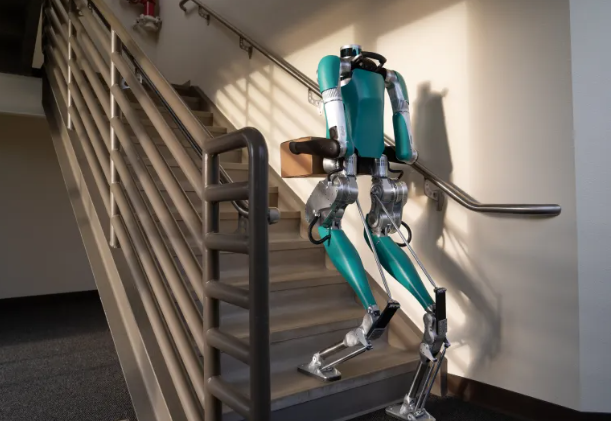
Photo courtesy of The Verge
Robots with Packages
Amazon’s humanoids may soon be delivering packages. They’ll ride along in the Amazon van, navigate sidewalks, walk upstairs and hand you your stuff. The G1 from Unitree is one of the models being tested. But even without these robotic delivery boys, Amazon employs about 750,000 robots. They work in the warehouses.
Internut
“Bioengineered tooth mimics the real thing.” Search on that phrase to read how Tufts University scientists developed a tooth that talks to the brain like your own teeth do.