
GETTING FUNKY WITH PHOTOS

Teenage me on the left. Photo altered with BeFunky’s “PolyArt” setting.
My brother sent me a picture of myself in a canoe. It looks like a lovely painting. He did it with “BeFunky,” a free app.
The free version of BeFunky leaves a watermark, but I still like it. Unfortunately, there’s one other limitation. To save your creation, you need BeFunky Plus, which is $72 a year. But you can still have fun with the freebie, by taking screenshots to share stuff online or by email. I use the Windows Snipping Tool.
BeFunky has literally dozens of artsy effects, including everything from charcoal to impressionism and “poly art.” With the plus version, I could turn my creations into full-sized prints or photo gifts at a site like Mpix.com, where I’ve been ordering statuettes. Most of the other effects, like cutting out the background to replace it with something exotic, or taking out wrinkles, also require BeFunky Plus.
I prefer using BeFunky online, on a Windows desktop, by bringing in my Google Photos, as well as photos from other sources. But there’s also a free app for iPhone and Android.
 Hand Warming

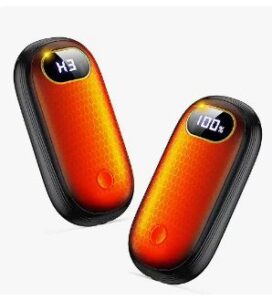
Unless I’m carrying groceries, I no longer have to bring gloves on my wintry Chicago-area walks, thanks to battery operated hand warmers. When I take my hand out of a pocket, it warms up the instant I put it back in. With a press of a button, I can even turn on a flashlight. In a pinch, a hand warmer can also charge my phone.
The Boiros “Rechargeable Hand Warmers,” which were on sale on Amazon for $29 when last I checked, have eight levels of warmth. You can heat one or both sides of the palm-sized objects, which are similar in shape to a computer mouse. They last for about six hours before needing a charge.
Your phone has some amazing tricks up its sleeve. But you have to know where to look.
On my Pixel 6a, I found some neat stuff by going to “Settings” and tapping “Tips and Support.” On a Samsung, tap “Tips and User Manual.” On an iPhone, open the “Tips” app.
Using Samsung tips on a $300 phone, a friend discovered he could change his camera from 12 megapixels to 50 megapixels. With one of the more expensive Samsungs, you can get even higher resolution. Here’s another tip for Samsung owners: You can enable auto-blocking of apps from unauthorized sources and prevent thieves from connecting a flash drive to hack your data or make changes to your phone.
Your New Amazon Library
Amazon now offers a free, yet superior way of displaying and organizing your whole library of e-books, audio books and print books. It’s called “Amazon: Your Books.”
Google that phrase to go there on a computer, phone or tablet. You’ll see icons for every book you’ve ever purchased on Amazon. Click a tab called “Notes and Highlights,” then choose an e-book title to see everything you’ve ever underlined. Under “options,” you can start reading the book immediately.
To zero in on a particular type of book in your library, click one of the three tabs at the top: “Genres,” “Authors,” and “Series.” Above those tabs, click the “Saved Books” link to see your wish list. Turn on “Discovery Mode” to get recommendations. Finally, click the three vertical dots to save the site to your phone’s home screen. (This last tip is one you can use to save any site to your home screen.)
Scam City
A reader said his wife got an email that appeared to be from PayPal but wasn’t. It asked her to cancel a transaction by logging into AnyDesk.com.
AnyDesk, like TeamViewer, is a legitimate method of controlling someone else’s computer from afar. It’s often used for tech support, but hackers use it too. Fortunately, the reader said “Hell no.”
Cheating With ChatGPT
A Stanford study found that students don’t cheat any more than they did in the past, now that they can use ChatGPT and other forms of artificial intelligence. Before ChatGPT even got started, about 60 to 70 percent of students admitted to cheating once in the previous month.
But even if they do use AI, there are workarounds. One professor told me of a colleague who tells students to let AI write their papers but critique the results. “They were the hardest graders ever,” he said.
Fighting Artificial Intelligence in Art
Programmers have figured out a way to prevent ChatGPT and other AI systems from stealing human art to make it their own. A program called “Nightshade” allows artists to make changes that cause AI systems to break down. Humans can’t see those changes, but the bots can.
Internut
“18 ChatGPT Prompts to Spark Innovation At Work.” Search on that term to find some helpful suggestions from Forbes Magazine. For example, type “Give me ten off-the-wall uses for [tool/process] in [industry/project], replacing the words in brackets with your own suggestions. I typed in “paint roller” instead of “tool/process.” For the “industry/project,” I wrote “entertainment.” ChatGPT gave me 10 suggestions. Here’s the first one: “Attach a giant paint roller to a rotating platform, and have performers move within it, creating intricate spirograph-like patterns on a large canvas or stage backdrop.”
Filed under: AI, Amazon, art, gadgets, Internuts, photos, security