
GIVING AWAY OLD COMPUTERS
A reader asked me how he might safely donate a computer to a local refurbishing group. “Our son-in-law takes the hard drive out and destroys it with a hammer,” he said. “Is that the best way?”
Unless you have business secrets or a celebrity past, you probably don’t need to destroy or remove perfectly good equipment. Instead, try the free Windows program “Eraser,” which uses Department of Defense-level data destruction algorithms to get rid of files permanently. For Macs, there’s “Clean My MacX Shredder,” $40. Both are highly recommended by TechRadar. But for most people, a factory reset is enough. Even for an expert, it would take specialized software to restore your files after a reset, which often doesn’t work.
To do a factory reset on Windows 10 and 11 computers, type “reset this PC” into the search box at the bottom of the screen. Then choose “Remove everything.”
For Windows 7 and XP computers, find “System and Security” in the Control Panel. From there, click the restore option. Then click “advanced recovery options” to find “factory reset.”
For Chromebooks, hold the “Ctrl” key, the “Alt” key and the “Shift” key and tap the letter “R,” to do a powerwash.
For Macs, search on “How to Wipe a Computer Clean of Personal Data,” for a great article from Consumer Reports, or check out the YouTube videos.
Calling Chat GPT
I just called 800-Chat GPT, (800-242-8478), a new service from Open AI. A cheery female robot asked how she could help. I wondered what series of books she would recommend for a boy who likes the “Dogman” graphic novels. She suggested “Big Nate,” by Lincoln Peirce, among others. I also asked her about joining a new gym in my area, so we discussed the pros and cons. When I asked for a vegan holiday dish, she recommended stuffed acorn squash or lentil loaf. She greeted me like a friend when I called back, a nice touch. You get 15 minutes a month of robotic conversation by phone for free.
Group Text Annoyances Revisited
My sister suggested a way to make group texts less annoying: Mute the notifications for a particular group message.
To do that on an iPhone or iPad: Open iMessages, then tap a message. Now slide left and tap the mute icon. On an Android phone, open the Google Messages app, then open the message you want to mute. Tap the three dots in the upper-right corner. Tap “Group Details.” Now toggle the switch next to “Mute conversation.” You’ll still get messages. But your group texts won’t ding you all day.
Printing from your iPad
“I wasn’t sure I could print from an iPad but have seen that I can with an air printer,” a reader wrote. “Never heard of that!”
All printers these days are “air printers.” They let you print wirelessly from your phone or tablet. Just open the app where your document is and follow these instructions. They’re virtually the same for iPhone, iPad and Android devices.
On both my iPad and Android phone, I opened a Google document, though I could have used Microsoft Word or some other app. Then I tapped the three vertical dots in the top right, chose “share and export,” and selected “Print.” Then I selected my printer and tapped the print icon. For a recipe attached to an email on my iPad, I tapped the up arrow in the right upper corner and chose “Print.”
Zero Jet Lag
“Time Shifter” is a $10 app for your phone that helps you avoid jet lag. Most reviewers are ecstatic. Here’s an example:
“We boarded our flight from Los Angeles to Singapore and followed the instructions regarding sleep, napping, being awake, etc. to the letter. When we landed in Singapore– which on the calendar was two days later– at 7:30 a.m., we just dropped our bags at the hotel and spent the day exploring with– no joke– zero jetlag!”
 3D Printer Solved Bubble Butt

A sea turtle with partial paralysis and bubble butt syndrome started swimming again, thanks to a 3D printer. Her name is Charlotte.
Trapped air kept Charlotte’s butt so buoyant, she couldn’t propel herself downward. So scientists rigged a high tech harness for her. First, a team from Formlabs, Adia and Connecticut’s Mystic Aquarium did a 3D scan of her body. Then, using an SLS 3D printer, they created a weight system that tilts her as the air bubbles shift. Hopefully other aquariums will use this design to free other bubble butts.
 Internut
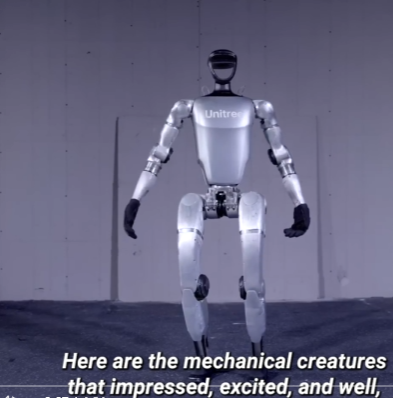
“The 10 Best Robots of 2024.” Search on that phrase to see the year’s best marvels, including the humanoid G1 robot, who can jump, climb debris-covered staircases and stay upright when you push him. At $16,000, he’s one of the relatively low-cost robots available for home use. Second place goes to the lab-grown human skin that can be worn by a robot.
Numbers Report
Over two-thirds of mobile traffic from around the world comes from Android devices, according to the latest report by Cloudfare, a cloud service. But in 26 of the wealthier countries, including the United States, Japan, Norway, Sweden, Australia and Canada, 50 percent or more of mobile traffic came from iPhones and iPads. In other news, internet use globally grew 17.2 percent. In Guinea, it grew 350 percent.
Filed under: 3D Printing, AI, apps, art, career, printer, robots, science, security, text messaging, trends, voice recognition