
PUBLISH YOUR BOOK
It’s free to publish a book on Amazon, but what’s the catch? Turns out there isn’t any.
Yet when I told an elderly woman about it, she was skeptical. She liked the idea of turning her novel into a paperback book, but balked when I told her that she would have to link her bank account to Amazon if she wanted royalties. “It sounds like a scam,” she said.
It isn’t. It’s a familiar practice for anyone who uses online banking. Besides, Amazon couldn’t have gotten this big by scamming people. It sends over $520 million in royalties each year to over one million authors, according to Words Rated.
To ease my friend’s worries, I offered to publish the book from my own KDP account. She happily agreed. I’m sure her royalties will be miniscule but I’ll send them right off. Unless you market the heck out of your book, no one will hear of it beyond family and friends. Over four million books are published each year.
After my friend agreed, I fixed the typos in her 352 pages. Then I sent it off to a freelancer at PeoplePerHour.com. I’ve used him before when editing other people’s books. He makes an ordinary manuscript look like a real book, and charges $225 for a little over 100,000 words. He’ll also tweak the book cover I created with a Canva template. (He asked me not to give you his name because he’s swamped. Everyone and their dog want to be an author these days.) But you can find other great freelance formatters and editors at People Per Hour.
Once you have your manuscript formatted, you can upload it, after first filling out a form on kdp.com. You’ll also need to upload an image of your book cover, including its front, back and spine. The site quickly checks to be sure your manuscript will fit neatly into paperback form. Three to ten business days later it will go live on Amazon. You can also upload an ebook version.
When your book is ready for sale, Amazon will notify you. You set the price. Ten dollars is common for paperbacks by unknown authors. With your author’s discount, you can buy copies for around $5.
Trouble with CCleaner
A reader said he stopped using the free CCleaner to speed up his computer because it removed his saved passwords, which was a hassle. I haven’t run into this problem, because the current version saves them automatically. But on sites using two-factor identification, you will be asked to put in a code sent by text so you can get back in. That’s kind of annoying, since you’ll have to do it every time you run CCleaner. If you think it sounds helpful though, there’s also a CCleaner app for iPhone and Android.
If you don’t want to bother with CCleaner, you can clear your computer’s internet cache and cookies whenever you’re in a browser such as Google Chrome, Edge, Safari, Firefox and others. Hold down “CTRL” (or “CMD” on the Mac), and the “SHIFT” key and tap the “DEL” key. Up pops an option to clear your junk. Click the advanced tab to exclude the stuff you don’t want to clear.
 Your Own Alphabet
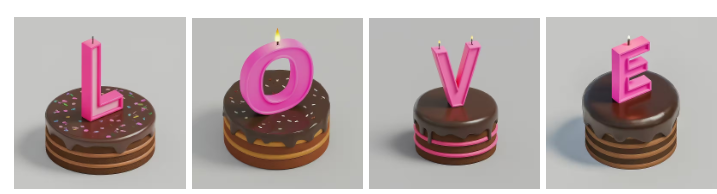
I just wrote an email using an unusual alphabet. The word “Love” came out in chocolate cakes, with each letter in the shape of a pink candle. It’s all part of the magic of Google’s new “Gentype” website, which gives you fonts generated by artificial intelligence.
Start by going to labs.google/gentype and describing what you want, or click “gallery” to use something they created. Once you’ve chosen your alphabet, click a letter and choose “copy” or “download.” I started by copying the “H” for “Hi,” then pasted it into Gmail, and dragged its handles to make it smaller. It’s perfect for a special birthday email, greeting cards or posts on Facebook and other social media.
 As Good as Ruby Slippers?

Click your heels and your phone dials Mom. That’s the promise of the “Shortcut Sneaker,” a collaboration between Samsung and Roel van Hoff, a Dutch designer. If you do a tap dance, your phone will play music. Thanks to motion sensors, five unique movements trigger five different shortcuts. Unfortunately, van Hoff is only making six pairs for now. But you can enter a contest to win one, if you do it before July 9, though you have to join Samsung’s Dutch community first. That’s a problem since the site is in Dutch. I gave up after going back and forth between Google Translate and the site.
Charger Blues
My phone wasn’t charging, but it turned out, all I had to do was reverse the cable. For other problems, try removing debris with a can of compressed air blowing into the cable’s receptacle, or unplugging the charger for 30 seconds, or, if you’ve got a multiport charger, try a different port. For more tips, see PCWorld’s article, “USB-C not charging?”
 Bloomin’ Walk

The free app “Pikmin Bloom” plants flowers which interact with you on your walk. It might give you an incentive to walk further. It was developed by the creators of Pokémon Go, but doesn’t require as much of you as that game does. If your phone has Augmented Reality, you’ll be able to see the cartoony flowers superimposed on the real world.
Filed under: apps, games, Google, inventions, troubleshooting