
NEW SECRET COMPARTMENT IN ANDROID 15
“Private Space” is coming to Android 15, the next version of the Android operating system. It gives you a secret compartment for all of your apps, photos, documents and more, similar to Samsung’s “Secure Folder.”
I enrolled in the beta version of Android 15 to try it out. Setup was easy. To start using Private Space, I tapped the word “Private” at the bottom of my app list.
Private Space is like having an extra phone. It includes separate versions of Chrome, Gmail, Photos, Camera, Files and the Play Store. You can add more apps directly to the private area.
To test it, I typed up a list of passwords on my computer, then took a picture by tapping the camera icon within Private Space. To view my password list, I tapped the private Files app. Unfortunately, sometimes I forget to tap the lock icon when I leave, which leaves the private space open. For more info, see “Android 15 Beta 2 – Everything New | Hands On,” on YouTube.
For the iPhone’s secret compartment, look up the iPhone’s “hidden photo album” feature. For Samsung phones, go to Settings, then search on the words “Secure Folder,” and follow the prompts.
Getting back to Android 15, the beta version, I think it’s draining my battery a little quicker, though that was supposed to be fixed in the latest update.
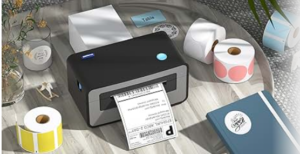 New Label Printer

Here’s a great way to put labels on your food cans, bottles, file folders and so on, or send off snail mail with a readable label. It’s the Polono P31S label printer, $14 on Amazon, if you use their coupon.
To start, download the app to your phone, then link it to the printer in your Bluetooth settings. The app can handle barcodes and QR codes as well as text. It also comes with templates for just about every category, including addresses, storage and medicine. The labels are about 1-⅝ inches long and 5/8 inch wide.
QR Code Warning
Just when I thought I’d heard of every possible hack, I learned about scammers who place stickers over legitimate QR codes in public places such as parking lots and shopping malls. If you scan a phony code, you could be taken to a website that steals your credit card info. So take a look at the web address as you hover over the code. If in doubt, type in the address yourself. I learned all about this from the CEO of QR Code Generator, at qrfy.com.
Don’t Track Me
If you think that someone might be tracking you with an AirTag they slipped into your bag or car, here’s a good way to find out.
On an Android phone, go to the Settings app and type “unknown tracker alerts.” Switch it to “on” if it isn’t already. Tap “Scan now” to check.
On an iPhone, go to “Settings,” tap “Notifications,” and turn “Tracking Notifications” on. If a notification says “AirTag found Moving With You,” tap the alert, tap “continue,” and “play sound” to have the AirTag start chirping so you can find it. Or look for it in the “Find My” map.
Robot News
– “Scan and Sand,” from Gray Matter Robotics, is a new robot that finishes off surfaces. It’s powered by AI and works in areas too dangerous for humans. According to the National Association of Manufacturers, without more robots, there will be a 2.1 million worker shortage by 2030. To see it in action, search on the phrase: “Meet the autonomous sanding robot designed to help labor  shortages.”
– “Sony’s Careful Robot Performs Microsurgeries.” Search on that phrase to see a robot performing microsurgery on a corn kernel. The stitches are tiny, and the corn is tender, but the robot has no trouble sewing. It’s designed for tiny tissues, nerves and veins. As the robot works, the surgeon can watch high-definition images on Sony’s OLED Microdisplay. It’s being tested by Aichi Medical University of Japan.
Recovering Old Versions
I often rewrite a column nine times. But what if the eighth one is the best? Here’s how to recover an old version.
In Microsoft Word, click the title of the document, then “Version History.” Next, click the version you want to see. Turn on “Show Edits” to see how it varies from the previous version. Version History works with anything in your documents folder, or any other folder backed up to the cloud.
In Google Docs, click “File” then “Version History.” All the versions are listed by date and time, but you can rename them to make them more memorable.
Hot Phone
If you play games so intensely on an iPhone that it overheats regularly, consider a mini cooling fan attachment. I looked at the $26 Trakxy Magnetic Phone Cooler on Amazon for the iPhone 12 and up. Out of 165 reviews, the vast majority were positive, though three people said their fan stopped working after a while.
 Fun and Games

Pogo.com has a ton of free games that you can play safely with strangers, friends or computer bots. I just played a great game of Scrabble against an expert. Then I played Trivial Pursuit on my own. Besides word games, Pogo has card games, casino games, classic board games and more.
Unfortunately, the ads will drive you nuts until you upgrade to “Club Pogo.” That costs $40 a year but may be worth it.
Filed under: Android, games, robots, security, troubleshooting, word processing