
BUYING A PRE-OWNED IPHONE
 I get a lot of iPhone questions from readers, so I decided to buy a used iPhone SE for $95.
What amazed me most is how pristine this thing is. It was listed on eBay as “Grade C,” which means lots of scratches. But it looks brand new. No wonder the seller, Second-Hand Phones, has a 99.8 percent approval rating. He was sold out when last time I checked. But I saw other pre-owned iPhones for as low as $72.
My new iPhone SE is so tiny it looks like a phone from ten years ago, but came out in 2016. It’s less than five inches long and is only 2.3 inches wide. So why did it cost so much? It’s a jewel of a phone, and all iPhones tend to hold onto much of their original value. If I had minded the small size, I would have gone for the iPhone SE second generation, which came out last year and is much taller and wider. But I’m cheap. A used SE Second Generation iPhone starts at $177 on eBay, going up to over $400 for brand new. I saved between $82 and $305.
The best part of the Apple universe is their tech support. I called them at 800-275-2273 when I couldn’t sign into the App store. Then I agreed to share my phone screen with the tech. That way she could see what I was seeing while her red arrow showed me exactly where to tap. The problem turned out to be that I hadn’t filled out my billing info. I’d gotten too excited about trying out the phone. The App Store worked as soon as I put in my info.
Unlike most Android phones, five year-old iPhones still get the latest operating system updates, so mine updated to iOS 14.7 automatically. When iOS 15 comes out, my SE will get that too. But what if, down the road, it doesn’t upgrade to iOS 16 and I can’t install the apps I want? For example, those using iOS 12 today aren’t able to install any apps requiring iOS 14. But if you search on the phrase “How to Install Old Version of App on iPhone,” you’ll get an article showing you how to make apps work on older iPhones and iPads. One method is to download the older version of an app using AnyTrans from iMobie.com.
Spam Solution for iPhone Owners
I use extra email addresses to give out to merchants. That way I keep spammers out of my Gmail inbox. Then once a month or so, I check my AOL, Yahoo and Onmail accounts. But something better is coming to iPhone users, possibly as early as next month. It’s called “Hide My Email.”
Hide My Email will be part of the new “iCloud Plus,” which is free if you don’t need more than five gigabytes of storage space. Hide My Email will generate hidden, disposable email addresses to use with potential spammers. To stop getting email from a source, you’ll just delete one of your hidden email addresses. Another part of iCloud Plus is “Private Relay.” It prevents you from being tracked when you use Safari to browse the web.
Just Add Magic
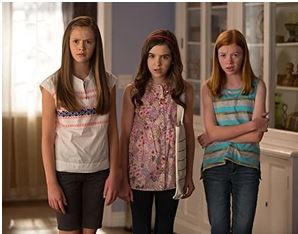 My favorite 10 year-old loves “Just Add Magic,” a wonderful series on Amazon Prime. The first season is about three girls who follow magical recipes to save Grandma. It’s so good that my little friend and I are making a Just Add Magic Cookbook. Here are the websites we used.
JustAddMagic.Fandom.com has all of the recipes from the series as well as recaps of the story lines that generated the recipes. To find fun pictures to go with them, we did a Google image search. For example, we searched on the phrase “Middle Eastern photo frame,” and plopped it around the text from the “Solve the Clues-Cous” recipe. Incidentally, it’s easier to arrange the frame and the text headlines, such as “Ingredients” and “Directions,” if you use a program like Hallmark Card Studio. This program also has some fun fonts and clipart.
To turn our recipe pages into a book, I Googled the phrase “Bookbinding for Kids,” and found five great suggestions on the site BabbleDabbleDo.com. For example after printing out a cover design to match the exact cover used on the show, I’ll staple all the pages together. Then I’ll use duct tape to cover the staples. The other mini cookbooks I made this way look great. One is for “Favorite Salads.”
Getting Rid of Ads
If you bought an Amazon Fire Tablet, and are tired of seeing ads on the lock screen, you can remove them for $20.
Go to Amazon.com and sign in. Click on “Your Account,” then click on “Content and Devices,” then “Manage Devices.” Choose your tablet. Look for a line that says “Special Offers.” Click “Remove Offers.” You’ll get a warning that you have to pay for that.
Internuts
 On YouTube.com, search on “Old Cartoon Videos for Kids” to see old favorites. The “Looney Tunes Biggest Compilation,” which runs for over four hours, has more than 59 million views.
NoMoreRansom.org has links to free decryption tools you can use in the event of a ransomware attack. These happen when a hacker asks you to pay a ransom in order to get your data back. According to CNBC, the total amount paid by victims has reached $350 million.