
MAKE ART IN A COUPLE OF CLICKS WITH FREE MICROSOFT APP
 Using the new Microsoft Designer, which is free, I made a personalized postcard showing an old-timey train heading toward a gorgeous mountain range. My friend said it reminded him of painting on velvet, but I think it’s great.
To start, I downloaded the app from the Microsoft Store for my Windows computer. Next, I chose a template, and tweaked it by typing over its description with my own words. Besides postcards, Microsoft Designer also creates images, photo collages, icons, stickers, wallpapers, birthday cards, Facebook posts, avatars and more.
For an avatar, I typed over the words “athletic, happy teenager shooting a basketball in an urban court at evening,” changing it to: “an athletic, happy woman with auburn hair in a ponytail doing the tree pose in yoga in a lakeside setting in Chicago in the evening.” The result was Disney-esque, but included a great view of Lake Michigan and the skyline. Next, I let the Designer make a greeting card, featuring a fantasy castle and several gymnasts vaulting over it. After I inserted it into a Hallmark greeting card program to make a two-page card, I printed it out and snail-mailed it. But any creation can also be emailed or posted online.
When you’re satisfied with your final result and want to try something else, click on “Microsoft Designer” to go back to the home page.
Are Apps Safe?
A reader wrote: “Capitol One Shopping is advertised as a good app that saves you money by comparing products for sale. How can a person tell whether certain apps are safe? Is there a way to analyze them? A friend always posts that ‘Apps are traps.’”
I disagree. Not only is it safe to get apps from the Google Play Store and the Apple App Store, it’s fine to add extensions like “Capitol One Shopping.” I’ve saved money that way, but I always get an extension from a reputable extension store. Besides the Chrome Web Store, there’s the Mozilla Firefox add-on page, the Microsoft Edge add-on page, the extension category in the iPhone/iPad App Store, and the extension or add-in page for other browsers, such as Vivaldi, Opera and Brave.
Going outside these places, you may land in unsafe territory. In 2017, for example, shady developers tricked 37,000 users into downloading a fake version of Adblock Plus, according to Keeper Security. But the incident only happened because the users went to a rogue website. I’m using seven extensions from the Chrome Web Store right now. My new favorite is “FakeSpot.”
Spotting the Fakes
“Fakespot” tells you whether product reviews are fake or not. It analyzes reviews on Amazon, Walmart, BestBuy, Sephora, eBay and Shopify.
To use it on your computer, go to Fakespot.com and add the extension. Then go to your favorite shopping site. It will mark each review using a grading system from “A” to “F.” After checking out the grade, click or hover over the word “highlights” to see a summary of the most helpful comments. For example, when I searched for a yoga mat on Amazon, I got a page with 38 choices. When I hovered over one with a “B” grade and the words “7 highlights,” up popped a wonderful summary. Fakespot also has a switch to turn off ads.
How does Fakespot make money? I was glad to find out that businesses can’t pay to have bad ratings removed. Fakespot makes money through ads on its website and apps, and by earning a commission when users click on links to products or sellers. There’s also a Fakespot Pro Browser for your phone, but it didn’t work for me. The extension is much better.
AI Doctors
ChatGPT scored a 98 percent on the same test that doctors take to get their medical licenses. The average doctor gets only 35 percent right, and needs only 60 percent to pass.
Scott Gottlieb, M.D., the former FDA commissioner, told CNBC that he helped conduct this study to compare the AI systems doctors are already using extensively. He recommends using ChatGPT to diagnose your own symptoms, but says it’s best to upload actual lab results. Otherwise, the chatbot might tell you to go to the doctor first.
 Help for the Disabled

With smart glasses and headbands made by Aavaa, users with mobility or speech issues can control their phones, computers and gaming devices by moving their head, blinking, or using facial gestures. The battery lasts for 45 hours before needing a recharge. Prices start at $1000 at aavaa.com.
Amazon’s War on Plastic
An Amazon fulfillment center in Ohio became the first in the nation to start using paper instead of plastic. Perhaps they were responding to a report by Oceana, which said that in 2022, Amazon packages worldwide used enough plastic to circle the Earth 200 times in air pillows. Though Amazon said that info is wrong and misleading, they’re trying to do something about it anyway. In Europe and India, their fulfillment centers have already switched to paper.
 Internuts
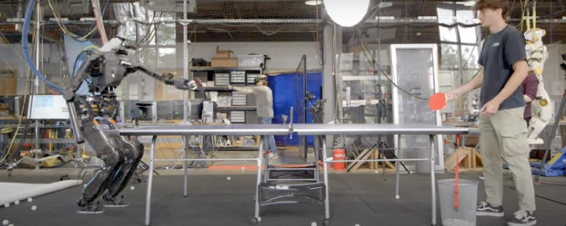
- “Watch this ping-pong playing droid flex.” Search on that phrase to watch a robot playing a gentle game of ping pong with a man.
- SarasFavoriteThings.com has fun games, like “The Fishbowl Game,” a hilarious variation on charades. To find it, click “Categories” at the top of the page, then “Games and Crafts.”
Filed under: AI, Amazon, apps, electronics, environment, health, Internuts