
JUMPING SHIP
 I loved canoeing to an Alaskan glacier, kayaking around islands and river rafting past eagles after a hike in a rainforest. But I hated the dropped calls and spotty internet on board the Discovery Princess.
I blamed it on my Samsung Galaxy A16, which I bought after my Pixel 8 phone died in a pool of salad dressing. After Googling “problems with the Galaxy A16,” my suspicions were confirmed. For the entire week on the “Holistic Holiday at Sea,” my phone had problems making calls and connecting to the internet. Meanwhile, my iPhone-owning friends connected everywhere but the elevators.
For one wild minute, I considered getting the new iPhone 17 when I got back home. But I don’t need its ultra-wide camera, its slightly larger screen, its faster wireless charging, its enhanced AI, its brighter display in direct sunlight, or its 30 hours of video playback. I’ve never watched a video on a phone for more than 20 minutes.
So I chose Apple’s budget model, the iPhone 16e, which came out in February. According to Microsoft Copilot AI, it offers “the most magic for a fraction of the price.” I found it on sale at Xfinity.com for $8.33 a month for 24 months, a $400 discount. But when the site ran into “technical difficulties” during checkout, I was stymied. So I took a screenshot of the offer and walked around the corner to the Xfinity store.
The Xfinity guys offered me a deal I couldn’t refuse: an iPhone 16e for $199.92, plus unlimited data, an Apple Watch SE (first generation), and a monthly cost of $74 until I’ve paid off both devices, after which it will drop to $40 a month. However, my first bill was $50 for both internet, cell phone and devices. Go figure.
The deal also includes a separate phone plan for the watch, which means I can make and take calls even when my phone is elsewhere. Not only do I feel like Dick Tracy, it’s been great for keeping up with texts. I used to forget about them for days at a time. Now when they flash on my wrist, I act.
In short, joining the Apple universe feels like a big step up. But I’m not sure I can blame my Android phone for all my troubles at sea. It may have been partly Xfinity’s fault.
Xfinity rents its phone towers from Verizon, which means its customers are “deprioritized,” especially in crowded areas with heavy network use. That’s probably why my phone freezes occasionally, most memorably when I was trying to show my boarding pass at the airport on the way home. For several scary moments, the screen blurred. But on the ship, it wasn’t a temporary problem. I wasn’t connecting, period. So I can’t blame Xfinity’s cell phone tower arrangement with Verizon. I was using the ship’s Wi-Fi.
Bottom line: I’m happy I joined Team iPhone. Besides the good connections, my voice sounds better to my friends, and its facial recognition is superb. I prefer the iPhone keyboard to Android, though I can’t place a cursor between letters as easily. Plus, the apps aren’t organized alphabetically in one long list when you swipe up, but I’ll use folders instead.
 Ship Tech
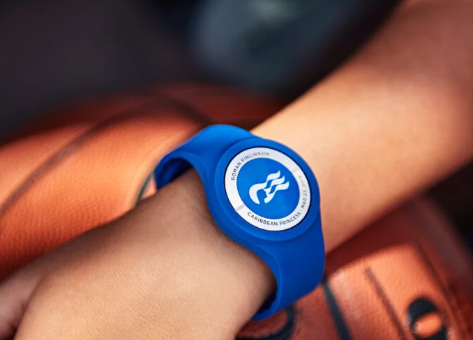
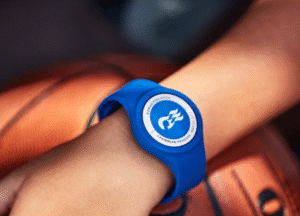
On board the Discovery Princess, a wearable “Medallion” handled nearly everything on the ship. I could even swim with it.
Besides going underwater, the Medallion opened my cabin door, greeting me with my picture from several steps away. I never had to show my ID on excursions, or when boarding or exiting the ship, buying books or using the internet cafe. I just flashed my wrist. My roommate used the Medallion’s companion app to order tea. Thanks to location tracking, crew members could bring it to her anywhere she happened to be. The app also made it easy to find activities, create an itinerary and connect with our shipmates.
 Power Bank Doubles as a Camera Grip

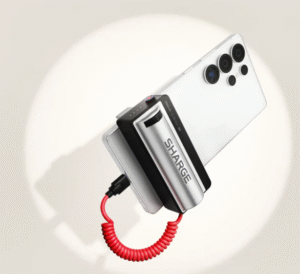
If you’ve ever struggled to hold your phone steady while taking a picture, you might like the Grip Power Bank, $40 from sharge.com. Besides keeping your phone still, it recharges it, using a 5000-milliamp battery.
To take pictures, you use the Grip’s shutter button. The Grip also has a zoom feature, so you don’t have to fiddle with your phone at all.
My techy friend loves it, though he says the shutter button is a bit finicky. A light press locks the focus in place. It’s designed for situations where the camera doesn’t want to focus on the object you wish to shoot. For example, the camera may have trouble with certain colors. The trick then is to focus on something nearby that’s about the same distance, lock the focus, then shift to what you want to photograph and press the shutter button all the way. There are also some artsy reasons for locking the focus elsewhere.
A hard press takes a picture or video. But don’t hold it too long or you get multiple shots. “It’s still better than fumbling by hand,” my friends says, “and the zoom feature works slick.”
Wi-Fi Versus Cellular
If you have an unlimited data plan, is it better to use data instead of Wi-Fi? No. Wi-Fi generally provides faster speeds and a more stable connection, while helping to preserve your phone’s battery life. Use data when you’re out and about.