
NEW VENMO CREDIT CARD PAYS OFF IN CRYPTO
I’ll never forget being stuck in North Carolina without enough cash to pay for a bus to a remote retreat. When a fellow passenger lent me the money, I immediately paid her back using the Venmo app. That turned me into a Venmo fan. Now I have their new credit card.
The Venmo card offers three percent back in your favorite category, such as groceries. It also gives you a virtual credit card number, which protects your real card number from prying eyes. What’s more, you get 10 percent back at 95 golf courses.
My favorite perk is the crypto option, which gives you cash back in Bitcoin, Ethereum or one of the other major cryptocurrencies. Though the most I could invest per month, given a $250 credit limit, is $7.50, I like having skin in the game.
Investing in cryptocurrency used to be a major hassle, but at Venmo, I enrolled in the Bitcoin option in one tap. Back in 2017, I jumped through several hoops just to get my account set up at Coindesk, including the acquisition of a super long passcode which I stored in a safe place. You’ve probably read about James Howell, the 38-year-old who would have been worth over $1.8 billion today if he hadn’t stored his code in a computer he threw away 10 years ago. He never did get the city council of Newport, Wales to let him comb through the landfill to look for it.
Try Another Browser
A friend who gets certain free products once a quarter from CVS as part of his Aetna insurance plan recently got a message that the product he wanted wasn’t covered. But when he switched web browsers from Firefox to Vivaldi, he was able to order it. I’ve had to switch from Chrome to Vivaldi on occasion too. It pays to have at least two browsers installed.
Fixing Printer Woes
When a friend’s HP printer wouldn’t print, I downloaded the “HP Print and Scan Doctor for Windows” app from the company’s website. It told me how to fix things.
I found the app when I searched on “HP printer offline.” It said I should turn the printer off and on again, which I’d already tried. But it also suggested turning off the computer and the router/modem, which I hadn’t. That fixed everything.
Unfortunately, I couldn’t find a comparable app from other manufacturers. So I suggest that if your Epson, Canon or other printer gets a “printer offline” message, try turning off your router, computer and printer. Then wait 30 seconds before turning them on again.
The Boring Phone
HMD, the same company that announced an upcoming Barbie flip phone, recently announced the Boring Phone, a flip phone with a beer theme, brought to you by Heineken and Bodega, a clothing retailer. Heineken is giving away 5,000 of them to celebrities, influencers and the general public. They claim it’s so boring, it will end phone addiction. Another way would be to keep your smart phone, but turn off most notifications in the Settings app. Then uninstall any apps you don’t need.
Family Bell
At 7:30 a.m. every weekday morning for years, my Google Home smart speaker would loudly announce: “Time to brush your teeth.” I couldn’t get rid of it. Neither could Google tech support. But one day it vanished, replaced by “Family Bell.”
Family Bell is like the old dinner bell that called the family to the table. You can have it ring on every phone in the house if you wish. If you get sick of it, it’s easy to toggle it off. To find it, go to the Settings app on your Android phone and type “Family Bell” in the search box. To find Family Bell on an iPhone, open the Google Home app, tap your profile picture, then tap “Assistant settings.”
Rent a Printer
You can rent a new HP printer and get regular ink deliveries for $7 a month. But you have to keep your printer connected to the internet, which allows them to share your info with advertisers. You also have to use HP ink, but that’s typical. Once you’ve signed up, you have 10 days to cancel without a fee. After that, you’ll pay between $60 and $270 to break the contract, depending on how close you are to the end of your commitment.
Robot News
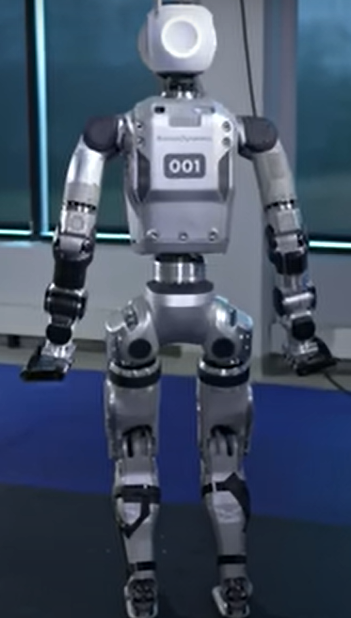 – Boston Dynamics’ new Atlas robot can do many things humans can’t. When he’s flat on his back with his legs stretched out before him, for example, he can fold his legs up and over his torso, with his feet facing toward his head, then rise in one swift, fluid movement. After a bit of work, he takes a mini dance break. To see him in action, do a search on “New Atlas Robot is a swiveling, shape-shifting nightmare.”
– “Menteebot” is a full-sized robot companion. If you ask him to “go to the table in the kitchen and wait for instructions,” he’ll do it, then announce: “I have arrived. What shall I do now?” In an Engadget video, a woman answers: “Please put the fruits in the container and place it on the counter behind you.” It takes him a minute and a half to pick up and move two apples. Learn more at Menteebot.com.