
FLIPPING OUT OVER THE FLIP PHONE
 I’m not addicted to my smartphone. But if I was, I’d switch to a flip phone.
Today’s flip or clamshell phones can do a lot more than you think. For example, they can hail an Uber just by dialing 833-USE-UBER, or 833-873-8237. Once a driver has been assigned, you’ll get a text message with their name, picture, license number and estimated time of arrival. If you prefer Lyft, the $80 Jitterbug Flip 2 phone comes with an operator who will schedule a ride and stay on the line with you until it gets there.
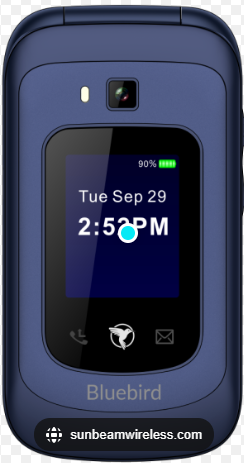
An alternative is the F1 Horizon Bluebird, a $249 flip phone from Sunbeam Wireless. It doesn’t come with a personal operator, but you get lots of apps and features, including the free Google Waze app for turn-by-turn directions and traffic alerts, text and picture messaging, a camera, a touch screen, a music player, a weather app and Wi-Fi Hotspot capabilities. It also has a flashlight, a sound recorder and a calculator key. It lacks a web browser, social media apps and other addictive features.
Some say Millennials are going back to flip phones, but when my sister took one out at work two years ago, her co-workers gasped. Yet she’s the one who should feel superior. All they do on their lunch hour is watch old sitcoms. She knows this because she hears the canned laughter. Now she has a smartphone but doesn’t overuse it.
My Bad
Recently, I wrote about changing the “swipe options” on an iPhone, but you have to have the iPhone 15 Pro or iPhone 15 Pro Max to get the feature. If you do, tap “Settings,” then tap “Swipe Options.” Select the swipe option you would like to change. There are four of them: short-swipe left, long-swipe left, short-swipe right, and long-swipe right.
But if you don’t have the latest model, don’t worry. To delete a text, all you do is press and hold it until a menu pops up, then tap “delete.” To delete an email, tap it, then tap the icon for a trash can.
School Time, Not Phone Time
The new “School Time” feature for Android phones is coming soon. It will be part of the free Google Family Link app. The idea is to stop kids from using their cell phones at school.
“But hey buddy, I’ve got you covered,” as a guru on Quora.com said. On a Samsung phone, he explained, just put your apps in a Secure Folder to keep all activities incognito and allow usage at any time. On Androids and iPhones, there’s an option in accessibility settings that puts a system menu on the screen. Just tap the menu to launch your app, day or night. In short, there’s no substitute for good parents. Or a good flip phone.
App Happy Math
PhotoMath is a free app from Google that solves math problems. It sounds like cheating, but it helps parents figure out how to help their kids by showing the steps involved.
I tried it out by writing down an equation, then taking a picture of it. When I didn’t understand a step, I tapped “why.” Unfortunately, you need PhotoMath Plus for an explanation. After the free trial, it’s $10 a month or $70 a year.
But PhotoMath has trouble with word problems. Its artificial intelligence looks for a similar problem that may not be that similar. In my test, it got a simple statistics problem wrong.
Battery Woes
Ideally, I’d start charging my phone’s battery as soon as it dropped to 20 percent. This would extend its life. But more often than not, I let my phone circle the drain. Cue the battery widget.
A new battery widget on my phone’s home screen shows a box with the percentage of battery left, both for my phone and headset. If a blue color fills the box three quarters of the way, I know the phone has 75 percent left, and so on. I can size it up in a quick glance.
Get a battery widget for your Android by pressing on a blank area of the home screen. Then tap “widgets,” and type “battery” in the search box. On an iPhone, tap and press on a blank area of the screen until everything starts jiggling. Next, tap the plus sign in the upper right and search on the word “battery” or scroll down until you see one.
A Quick Summary from AI
You can use ChatGPT the way college students do: Upload a long article and ask for a summary.
To test it, I uploaded the PDF of an article by Economist David Henderson about the impact of the late Nobel Laureate Milton Friedman. Then I asked: ‘How did Milton Friedman’s economic beliefs challenge the prevailing Keynesian consensus of his time?’” ChatGPT got it exactly right, but Google’s NotebookLM was misleading. On the other hand, NotebookLM was better in other queries, especially emotional ones. The bottom line: If you don’t get a good answer from one service, try the other.
 Internut

“Engineers create truly green hydrogen gas using only seawater, soda cans and caffeine.” Search on that phrase to read about the scientists who are using only those ingredients to produce hydrogen. It’s both cost effective and scalable and without involving fossil fuels.
Filed under: Uncategorized